Contents
Telegram is considered one of the most prominent instant messaging applications around the world due to its high privacy and unique features such as channels, large groups, and voice and video calls. However, some users face the issue of not receiving the activation code when trying to register or log in with a new phone number.
In this article, we will detail the reasons for this issue and how to solve it step by step, along with additional tips and frequently asked questions to ensure a smooth and secure user experience.
Related: Solution for the Problem of Not Receiving the WhatsApp Activation Code (Final Solution)
Reasons for Not Receiving the Activation Code on Telegram
1. Internet Connection Issues
The cause might be simple, such as weak internet speed or partial disconnection. When registering a phone number on Telegram, the application requires a stable internet connection to send the request and receive a message or call containing the code.
2. Privacy and Firewall Settings
If you are using a firewall or privacy protection apps that prevent receiving SMS messages or calls from unknown numbers, these settings might block the receipt of the activation code.
3. Errors in Entering the Phone Number
The most common mistake is selecting the wrong country code or entering the digits in the wrong order. Ensure that you select the correct international code for your country and enter the numbers without spaces or additional symbols.
4. Server Delays or Issues with Telegram’s System
Sometimes, Telegram’s servers may experience heavy load or temporary maintenance, causing delays in sending activation messages or temporary service outages. In such cases, the problem is beyond your control and requires some patience.
Effective Solutions to the Problem of Not Receiving the Activation Code
1. Receive the Activation Code via Another Device
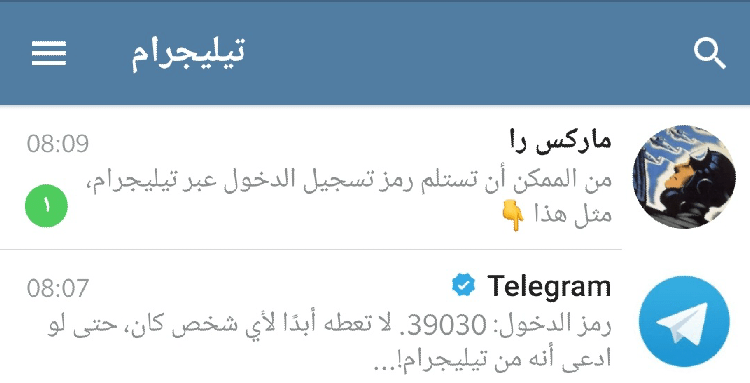
Don’t be surprised. If you have activated Telegram on one device, Telegram will send the activation code to your account on your old device. So when activating Telegram on another device, Telegram does not send an SMS text message to your phone, but rather to your Telegram account on the other phone.
Related: Telegram QR Login
So check the accounts open on other devices.
Important: Sending the code to Telegram is not a permanent substitute for receiving the message via SMS. Therefore, keep your phone number active at all times.
2. Check Your Internet Connection
Start by checking your internet network, whether it’s Wi-Fi or mobile data. Try opening web pages or using other applications to ensure that the connection is stable. If there are issues, restart the router or turn on airplane mode and then turn it off to reconfigure the network.
3. Review the Phone Number and Enter It Correctly
When you reach the phone number entry page in Telegram, choose your country code carefully, then add your number without the starting 0 (if required). Also, ensure to remove any spaces or dashes between the numbers before pressing “Next”.
Enter the phone number in the following format: +(Your Country Code)(City Code or Telecom Provider Code)(Your Number).
4. Disable Apps That Block SMS
If you are using apps to block messages or calls from unknown numbers, temporarily disable them or allow the Telegram activation number as an exception. You can also check the blocked messages folder in your phone’s default messaging app.
5. Use the Voice Call Option to Receive the Code
If SMS messages fail to arrive, Telegram allows the “Voice Call” option to send the code via a voice call. Choose this option and wait a few minutes to receive the call, then listen attentively and enter the spoken numbers.
6. Check Message Settings
Your phone might direct automated messages to the “Spam” or “Filtered” folder. Review this folder and look for the activation message. On some devices, you may need to go into the messaging app then SMS settings to access these messages.
7. Update or Reinstall the Telegram App
Use the latest version of the Telegram app from the Google Play Store or App Store. Updating ensures fixing previous bugs related to receiving codes. If the problem continues, completely uninstall the app, then re-download and try again.
8. Contact Telegram Support
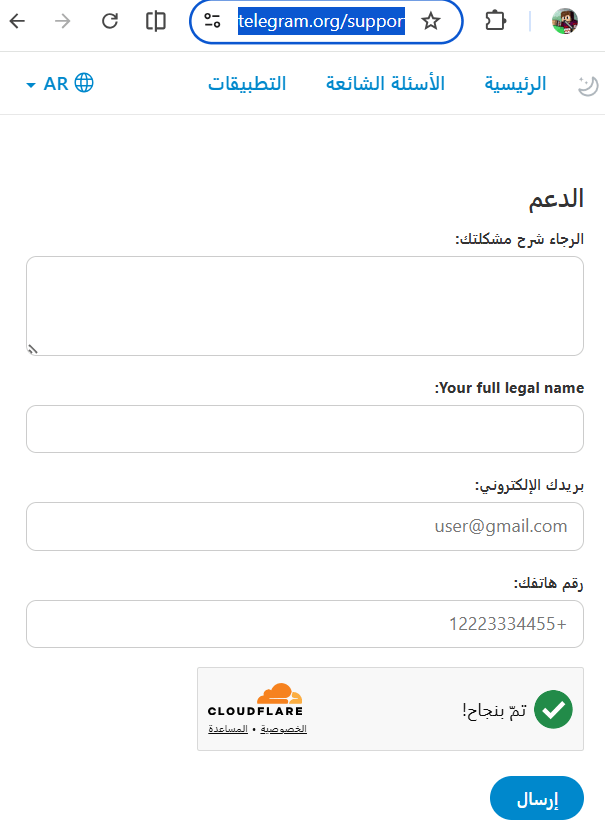
If none of the previous solutions worked, you can send a message to Telegram’s technical support and explain the problem in detail by visiting the link Telegram Support.
First, clearly and briefly explain your problem. For example, write: “I have a problem that the Telegram activation code does not reach my phone”.
Then write your full name and correct email address so they can contact you via email.
Write the phone number to which you did not receive the code, then click Send.
Additional Tips
In addition to the previous solutions, here are some points that may help you resolve the issue of not receiving the Telegram activation code:
- Use a different data network: Try activating the code via mobile data if you are using Wi-Fi and vice versa.
- Activating airplane mode and turning it off before retrying sometimes helps reconfigure the network and receive messages.
- Wait 5-10 minutes before requesting the code again to avoid protection policies that block repeated requests in a short time.
- Contact your mobile network operator’s support: Sometimes the cause may be related to the network itself. Ensure the service is functioning correctly and receiving messages from short numbers.
- Use another temporary phone number: If you have a second SIM, try activating Telegram on it, then transfer the account to your main number later via Telegram settings.
Frequently Asked Questions
Why doesn’t the Telegram activation code arrive despite the phone number being correct?
The reason might be a delay in the operator’s network or pressure on Telegram’s servers. Wait a bit then try the voice call option. Also, ensure there are no message blocking apps or privacy settings preventing the message from arriving.
Can I request the code multiple times without problems?
You can, but Telegram imposes an increasing waiting period with each repeated attempt in a short time. It’s preferable to wait 5-10 minutes between each attempt to avoid temporary blocking.
Does using a VPN affect receiving the activation code?
In rare cases, some VPN services or proxies might prevent voice codes or SMS from arriving. To increase reception chances, disconnect from VPN during the activation process.
You may also be interested in: How to Change Geolocation and IP on iPhone for Free Without VPN Software
What should I do if I requested a voice call and it didn’t arrive?
First, contact your mobile network operator’s support to ensure that receiving calls from short numbers is enabled. Then restart your phone and try again. If the problem persists, wait a bit and try later.
Can I use a fake number to activate Telegram?
This is not recommended; using fake or temporary numbers may expose your account to hacking or blocking risks and lead to loss of access to the account if you need to recover your password or activate two-factor authentication.