Share:

Log in to Telegram from Google (Telegram Web)

Log in to Telegram from Google (Telegram Web)

In this article, we will talk about how to log in to Telegram from Google using Telegram Web and scanning a QR code. You can log in using a computer with any browser, whether it’s Google Chrome, Safari, Firefox, etc.

But first, you should know that Telegram Web is an application that works through a web browser without needing to download any software (Single Webpage Apps). It allows users to use Telegram, chat, and make calls even without downloading any application on the computer. This ensures more privacy as conversations will not be saved on the computer. We will alert you to all the features, precautions, and what remains of your conversations after closing the web page.

Before we continue, you must know that you need to have a Telegram account activated on your phone beforehand through a phone number, and you must have the Telegram app on your Android or iPhone to complete the authentication process and open Telegram Web via the QR Code.

How to Log In to Telegram from Google Chrome (Telegram Web)

You can log in to Telegram Web from Google and scan the QR code by following these steps:

Time required: 3 minutes.

Time needed: 1 minute

How to log in to Telegram from Google

  1. Open Google Chrome and go to Telegram Web

    You can open Telegram Web through the link https://web.telegram.org/ and a page with a QR code will open. Leave the page open and go to the Telegram app on your phone.
    Log in to Telegram from Google Chrome

  2. Open Telegram on your phone and select Settings

    Open the Telegram app on your phone and press the Menu button in the upper corner. Then choose Settings .
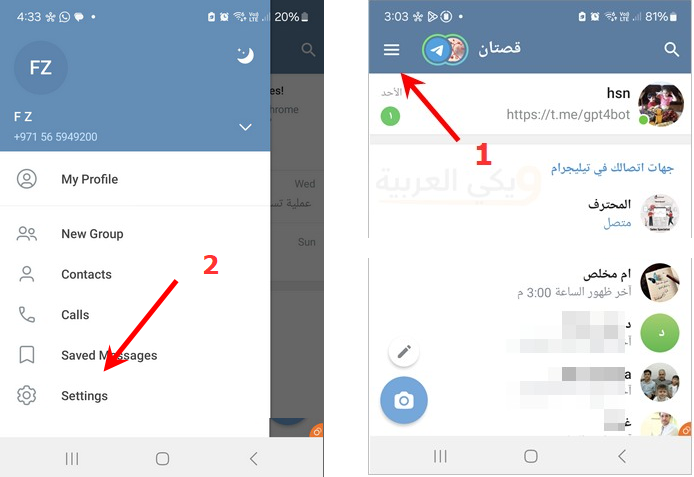
    telegram settings

  3. Select Devices

    Scroll down a little in the settings menu to find Devices.
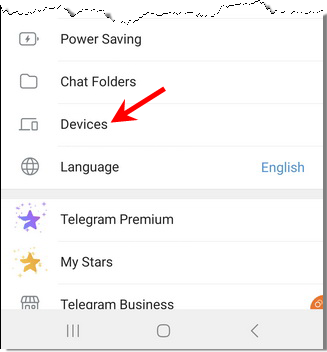
    telegram devices

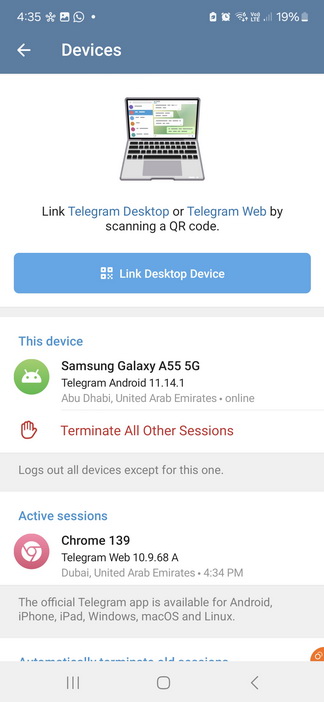
  4. Link Devices

    A page will open with a button (Link Desktop Device). Press the button. (Options to allow the camera to work will appear; press ‘Allow while using the app’).
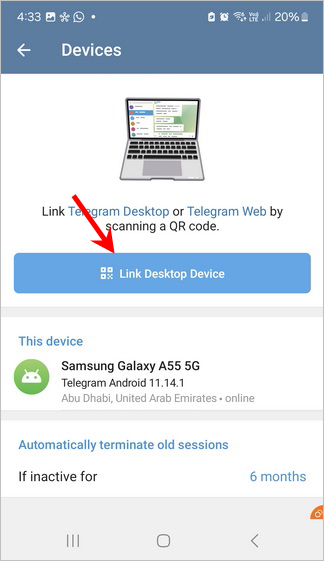
    telegram link device QR code

  5. Scan the QR Code

    Now the camera will open. Point the camera at the QR code on the computer screen. Authentication will happen instantly, and the conversations from your phone will open on the computer.
    Open Telegram Web on the computer

Now, as you can see, all your conversations will open as if you are using the Telegram app on your phone. You can also make calls from your computer, unlike WhatsApp Web, which does not allow you to make calls except through the official WhatsApp desktop application. This shows that Telegram Web is more flexible and powerful than WhatsApp Web.

Features of Telegram Web

Telegram Web allows us to use the Telegram application on a computer. The application can be opened from a browser like Google Chrome or Safari, etc. The great thing about this is the ease of opening Telegram on a computer without the need to download any software. Just open Google Chrome or any browser, complete the authentication process between the phone app and the browser, and start chatting.

Another advantage of Telegram Web (based on experience on the same computer) is that it is faster to open than WhatsApp Web and takes less time. It is also lighter on the computer.

Why Telegram Web? Some prefer Telegram Web on the computer for more privacy. When you download the official application, conversations will remain on the computer, which another person might open. To be fair, this is a double-edged sword; in terms of opening conversations, Telegram Web opens on the computer again even if you close the browser.

If another person comes and opens Telegram Web on the same computer, they will see your conversations! It’s quick to open without re-authentication but offers less privacy. However, you can certainly log out from your phone.

Logging Out of Telegram Web

You can log out of Telegram Web by opening the Telegram app on your phone and doing the following:

  1. Open the menu, then Settings.
  2. Press the Devices option.
Telegram logout from all devices

After that, press “Terminate All Other Sessions” and then press OK. You can also press on “Chrome” and log out from the Google Chrome browser. The other option shows you all open sessions and allows you to end the login from each browser.

It is essential to know how to log out, especially if we use Telegram Web in a cafe or a public place, or if the computer is used by more than one family member and you want to maintain your privacy.


أكثر هواتف آيفون مبيعاً

إعلان الهاتف

آيفون 16 128 جيجابايت

آيفون 16 128 جيجابايت

يُقدم هاتف iPhone 16 تجربة ممتازة تجمع بين الأداء القوي والتصميم العملي، مدعوماً بمعالج A18 المصمم خصيصاً لدعم مهام الذكاء الاصطناعي (Apple Intelligence). ويأتي بشاشة Super Retina XDR زاهية، إلى جانب زر التحكم بالكاميرا الجديد (Camera Control) الذي يمنح المستخدمين وصولاً سريعاً وسلساً لالتقاط الصور والفيديوهات.

ملخص آراء أشهر المواقع التقنية

"معالج A18 القوي يوفر سرعة هائلة وأداءً سلساً للغاية في تشغيل التطبيقات والألعاب الحديثة دون أي تأخير."

TrustedReviews
★★★★★

"زر التحكم في الكاميرا الجديد يضيف لمسة عملية رائعة ومبتكرة تسرع من عملية التصوير باحترافية."

TechRadar
★★★★☆

"عمر البطارية شهد تحسناً ملحوظاً مقارنة بالأجيال السابقة ليصمد بكفاءة طوال اليوم."

The Verge
★★★★★

المميزات

  • معالج Apple A18 القوي الذي يضمن كفاءة عالية في استهلاك الطاقة ودعم كامل لتقنيات الذكاء الاصطناعي.
  • زر التحكم الجديد في الكاميرا (Camera Control) للوصول السريع والتحكم الدقيق بالإعدادات والتصوير.
  • شاشة Super Retina XDR ساطع وعالية الوضوح تقدم ألواناً دقيقة ورائعة.
  • نظام كاميرا خلفية مزدوج محسن بدقة 48 ميجابكسل مع عدسة فائقة الاتساع تدعم التصوير الماكرو.
  • زر الإجراءات (Action Button) القابل للتخصيص لتنفيذ المهام السريعة بضغطة واحدة.

العيوب

  • الشاشة لا تزال تقتصر على معدل تحديث 60 هرتز، وهو أمر مخيب للآمال مقارنة بالهواتف المنافسة في نفس الفئة السعرية.
  • سرعات الشحن السلكي واللاسلكي تعتبر بطيئة نسبياً مقارنة بما تقدمه الهواتف المنافسة في السوق.
  • التصميم الخارجي والشكل العام يشبهان إلى حد كبير الجيل السابق مع تغييرات طفيفة تتركز في تصميم الكاميرا الخلفية.

مواصفات الهاتف

اسم المنتج بالعربيآيفون 16
اسم المنتج بالإنجليزيiPhone 16
تاريخ التوفر20/09/2024
الشركة المصنعةapple
نظام التشغيلiOS 18, قابل للتحديث لـ iOS 26.5
المعالجApple A18 3 نانومتر Hexa-core (2x4.04 GHz + 4x2.20 GHz)
ذاكرة RAM8GB
سعة التخزين128GB
حجم الشاشة6.1 بوصة
الكاميرا الخلفية48 ميجابكسل f/1.6
الكاميرا الأمامية12 ميجابكسل f/1.9
الصوتستيريو
وصلة سماعة 3.5غيرمتوفر
البطاريةLi-Ion 3561 ميللي أمبير
الشحن اللاسلكيمدعوم 25W
الألوان المتوفرةأسود/أبيض/زهري/أخضر فاتح Teal/أزرق بحري Ultramarine

إعلان الهاتف

آيفون 17 برو ماكس

آيفون 17 برو ماكس

يُعد هاتف iPhone 17 Pro Max قمة ما توفره أبل في عالم الهواتف الذكية، حيث يجمع بين التصميم العصري الجذاب بلونه البرتقالي الكوني والأداء الفائق بفضل معالج A19 Pro. ويقدم الهاتف تجربة بصرية مذهلة عبر شاشة Super Retina XDR العملاقة بحجم 6.9 بوصة، مدعومة بمنظومة تصوير متطورة تلبي طموحات عشاق المحتوى الاحترافي.

ملخص آراء أشهر المواقع التقنية

"«الشاشة الكبيرة والساطعة بحجم 6.9 بوصة تجعل مشاهدة المحتويات والألعاب تجربة غامرة بحق.»"

TrustedReviews
★★★★☆

"«نظام الكاميرات الثلاثي بدقة 48 ميجابكسل يقدم تفاصيل مذهلة وثباتاً استثنائياً في تصوير الفيديو الاحترافي.»"

TechRadar
★★★★☆

"«البطارية القوية مع معالجة الحرارة المحسنة تضمن أداءً مستداماً وطويلاً طوال اليوم دون أي تباطؤ.»"

The Verge
★★★★☆

المميزات

  • شاشة LTPO OLED فائقة السطوع بحجم 6.9 بوصة تدعم معدل تحديث 120 هرتز وتقنية Dolby Vision.
  • معالج Apple A19 Pro القوي المصمم بدقة 3 نانومتر لتقديم أداء سلس ومعالجة متقدمة لمهام الذكاء الاصطناعي.
  • منظومة كاميرات خلفية ثلاثية بدقة 48 ميجابكسل مع تقريب بصري محسن وكاميرا أمامية مبتكرة.
  • نظام تبريد متطور (غرفة بخار) يحافظ على استقرار الأداء وثباته خلال الاستخدام المكثف والألعاب.
  • عمر بطارية طويل ودعم للشحن السريع واللاسلكي المطور عبر تقنية MagSafe.

العيوب

  • الوزن والحجم الكبيران قد يجعلا استخدام الهاتف بـيد واحدة أمراً شاقاً وغير مريح لبعض المستخدمين لفترات طويلة.
  • ارتفاع السعر بشكل ملحوظ لكونه الإصدار الرائد الأعلى في عائلة أبل.
  • غياب مفردات التخزين القابلة للتوسعة (لا يدعم بطاقات الذاكرة الخارجية MicroSD).
  • سرعات الشحن السلكي واللاسلكي -رغم تحسنها- لا تزال تتخلف عن بعض الهواتف المنافسة في الفئة الرائدة.
  • خيارات التقريب البصري ما زالت تحتاج لتطوير أكبر لتنافس بعض القدرات الفائقة الموجودة لدى المنافسين.

مواصفات الهاتف

العنصرالمواصفات
المعالجشريحة A19 Pro وحدة معالجة مركزية مع 6 نوى
الكاميرا الخلفية48 ميجابكسل
سعة التخزين256 جيجابايت
حجم الشاشة6.9 بوصة
دقة الشاشة2868 × 1320
اسم الموديلiPhone 17 Pro Max
شبكة الاتصالمفتوح لجميع شبكات الاتصال
تقنية الاتصال الخلوي5G
تقنيات الاتصالBluetooth، NFC، USB، Wi-Fi
اللونبرتقالي كوني (Cosmic Orange)
Shopping Cart
اخترنا لك no posts found
×