
Contents
Here is a technical guide on the origin and evolution of the file systems FAT32 and NTFS as well as exFAT, the differences between the file systems, and which one to choose for SSD or HDD drives or flash memory. We will also discuss the directions that led Microsoft to develop these systems:
FAT32 File System
It was launched by Microsoft in 1996 with the second release of Windows 95 (Windows 95 OSR2). FAT32 (short for File Allocation Table 32-bit) came as an upgrade and development of the older FAT16 system.
The main reason for its development was the increased capacities of hard drives in the 1990s; FAT16 was unable to support drives larger than 2GB, while FAT32 was designed to support storage sizes theoretically up to 2TB, with reduced waste in storage space.
FAT32 is the king of compatibility; it works with all systems without exception: (Windows (from 95 to 11), macOS, Linux, Android), in addition to car recorders, televisions, and both old and modern gaming consoles.
Its critical disadvantage currently is that it does not support storing or transferring any single file larger than 4GB.
Read about: Formatting Protected Flash Memory
NTFS File System
Microsoft introduced it for the first time in 1993 with Windows NT 3.1, but it was adopted for regular users as a core system with the launch of Windows XP in 2001.
NTFS (short for New Technology File System) was built from scratch to be a professional system completely different from the FAT family. The primary goal was to meet the needs of the business sector and servers in terms of security and stability; FAT32 lacks security features. NTFS provided solutions for:
- Supporting very large file sizes (up to 16TB per single file).
- The Journaling feature: to protect data from corruption during sudden power outages.
- Encrypting and compressing files directly from the system and assigning permissions to users.
NTFS file system works efficiently (read and write) with the Windows system (it is the mandatory system for the C drive). On macOS, it works read-only (you can see the files without modifying them or copying to them except with external programs). On Linux, it supports read and write through special drivers.
Development Summary
- 1993: Birth of NTFS designed for networks and servers first.
- 1996: Birth of FAT32 to solve the issue of large drive sizes on personal computers.
- 2001: Microsoft officially moves users from FAT32 to NTFS as a core architecture for Windows (starting from XP) to keep up with the era of big data and security.
exFAT File System
The exFAT file system (short for Extended File Allocation Table) is a file system for storage devices that was developed by Microsoft in 2006, specifically designed to be the advanced alternative to the old FAT32 system, and the middle ground between it and NTFS.
In short, exFAT was created to solve FAT32’s biggest problem, which is the inability to transfer files larger than 4GB, while at the same time surpassing NTFS in work flexibility and compatibility with other systems like macOS and gaming devices.
Comparison of FAT32, NTFS, and exFAT File Systems
When choosing the suitable file system for your storage unit, you should balance between three main factors: storage capacity and file sizes, compatibility with various devices and operating systems, and security and stability level.
While FAT32 represents the technical legacy compatible with almost everything but with limited flexibility, NTFS stands out as an internal storage giant dedicated to Windows systems thanks to its event log that protects data and advanced encryption features. In contrast, exFAT represents the smart and modern solution that combines the best of both worlds: eliminating the size limits imposed by FAT32 while providing flexible compatibility that surpasses the strict limits of NTFS between Windows and macOS environments.
You may be interested in: The Difference Between SSD Drives of SATA and NVMe Type
Detailed Comparison Table:
| Comparison Aspect | FAT32 | NTFS | exFAT |
| Developed by and Year of Release | Microsoft (1996) | Microsoft (1993 / 2001) | Microsoft (2006) |
| Maximum File Size | Only 4GB | 16TB (practically) | 16 exabytes (virtually unlimited) |
| Maximum Partition Size | 2TB (up to 8TB maximum) | 8 petabytes | 128 petabytes |
| Compatibility with Windows System | Excellent (read and write) | Very excellent (mandatory for system C drive) | Excellent (read and write on modern versions) |
| Compatibility with macOS (Mac) | Excellent (read and write) | Read only (requires external programs for writing) | Excellent (Read and write without programs) |
| Compatibility with Linux Systems | Excellent (read and write) | Supports (read and write via specific software) | Supported (in recent kernel 5.7 and above) |
| Compatibility with Other Devices | Works on all screens, car recorders, and old platforms. | Poor (not supported by most screens, cars, or cameras). | Excellent with modern devices (PS4/PS5, professional cameras, smart screens). |
| Journaling Feature | ❌ Does not support (more prone to data corruption when suddenly disconnected) | Leads in data protection and automatic fault recovery | ❌ Does not fully support (but has improved mechanisms to reduce corruption) |
| Security and Data Encryption | ❌ Does not provide security permissions or file encryption | Supports file encryption and compression and assigning permissions to users | ❌ Does not support advanced built-in security features |
| Optimal Use and Filtering | Old and small flash drives (less than 32GB) and car audio devices. | Internal hard drives (HDD/SSD) for personal computers and servers. | Modern large flash drives, SDXC memory cards, and portable external drives. |
This comparison was prepared based on official Microsoft documentation and technical support reviews from Crucial and Kingston.
What is the Best File System for SSD and Others
What to choose when formatting storage units? Here is a direct practical guide for choosing the most suitable file system according to the device (internal/external hard drive or hard disk/flash/memory card or type of hard drive SSD/HDD or Windows/Mac operating system):
| Storage Device Type | Device or Operating System Used | Recommended File System | Result and Reason Briefly |
Internal Hard Drive (SSD / HDD) |
Computers running Windows only | NTFS | Mandatory and Best Performance: Provides you with the highest system stability and security and supports large programs and games. |
| External Hard Drive or Large Flash Drive (over 32GB) | For mobility between Windows and Mac devices or a modern phone | exFAT | Total Flexibility: You will be able to read and write on both ends and transfer large files (movies, projects) without restrictions. |
| Flash Memory or Memory Card | Cars, old television screens, or 3D printers | FAT32 | Highest Compatibility: Simple systems in cars and screens only recognize this old system. |
Professional Memory Card (SDXC) |
Modern digital cameras (4K shooting or photography) | exFAT | Global Standard for Cameras: Is the globally accepted default system for fast and modern memory cards to avoid recording interruptions. |
| External Hard Drive | For exclusive use on Mac devices only | APFS or Mac OS Extended | Optimal Performance for Mac: Apple’s systems provide external drives with better speed and compatibility with features such as Time Machine. |
💡 Quick Golden Tip for Users:
- If you are completely confused and the flash drive or external drive will be used between modern computers and phones ⬅️ choose exFAT.
- If the flash drive will go to a screen or car ⬅️ choose FAT32.
- If the hard drive is inside the computer ⬅️ choose NTFS.
Can You Format a Hard Drive with exFAT on Windows?
Yes, you can definitely format a hard drive (whether HDD or SSD, internally or externally) with exFAT.
However, before making this decision for a whole hard drive, there are very important considerations to know based on technical sources and operating systems:
1. If the Hard Drive is External:
exFAT is the ideal choice for external hard drives, especially if you are using the drive to transfer data between different computers.
The major advantage here is the high compatibility; if you format the drive with exFAT, you will be able to read and write data on it freely, whether you connect it to a Windows device or a Mac device, without being restricted to a certain file size (it supports large files like videos and projects).
2. If the Hard Drive is Internal:
Here, using exFAT as the primary system is not recommended, and here’s why:
- The Operating System Drive (C): Windows only accepts installation on NTFS, and Mac only installs on its own systems (APFS or Mac OS Extended). Hence, the system drive cannot be exFAT.
- Internal Storage Drives (like D or E): even if they are only for storage, it is always preferable to format them with NTFS on Windows. NTFS includes very advanced security features for hard drives, such as “Journaling” that protects data in case of sudden power interruptions, in addition to file encryption and compression features, which exFAT lacks.
You may be interested in: The Difference Between SSD and HDD Drives… Which One Should I Choose?
How to Format an External Hard Drive with exFAT on Windows?
Warning: The formatting process deletes all existing data on the drive, so make sure to take a backup first.
- Open This PC.
- Right-click on the hard drive you want to format.
- Select Format.
- From the dropdown list of File system, choose exFAT.
- Click Start to begin the process.
In summary: Make exFAT your first choice for external drives that you move between Windows and Mac, and rely on NTFS for internal hard drives inside your computer.
Does a Flash Drive Support Formatting with exFAT File System?
Technically, a flash drive as a device (hardware) supports any file system you format it with, whether it’s FAT32, NTFS, or exFAT. A flash memory is just raw storage that does not object to how data is organized within it.
However, the confusion many people face comes back to two main reasons related to the operating system and the flash drive size:
1. Flash Drive Size (Storage Capacity)
Older Windows systems do not allow formatting a flash drive with exFAT if its size is too small (less than 4GB, for example) through the normal graphical interface, and they automatically prefer to select FAT32. But practically, you can enforce the exFAT format on it via the command prompt (CMD) regardless of size.
2. Device and System Compatibility – This is the real issue
When we say “the flash drive does not support“, it usually means that the device you will connect the flash drive to is the one that does not support the exFAT system.
- Modern Devices: All modern computers (Windows 7 and above, Mac macOS), new smartphones, smart televisions, and gaming consoles (PS4/PS5/Xbox) fully support exFAT by default.
- Old or Specialized Devices: Car audio recorders, some old television sets, surveillance cameras, and 3D printers. These devices have very simple operating systems that only read the FAT32 system (because it is a free and open-source system that does not require licenses from Microsoft).
Final Advice
- If you will use the flash drive between modern computers and phones for transferring large files ⬅️ choose exFAT.
- If you want to use the flash drive on an old television screen, or in a car audio recorder, or old gaming devices ⬅️ you must choose FAT32 to ensure it is recognized by the device without issues.
How to Format Flash Drive or Memory Card with exFAT File System
Remember that formatting or initializing will erase all data on the flash drive. Thus, be sure of your decision before formatting.
In any case, the formatting process is easy and takes seconds by following these steps:
- Connect the flash drive or memory card to the computer.
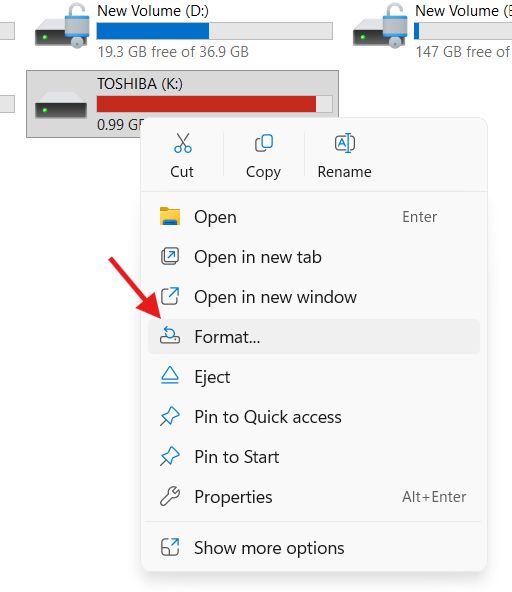
- Open My Computer to find the flash drive.
- Right-click on it and select Format.
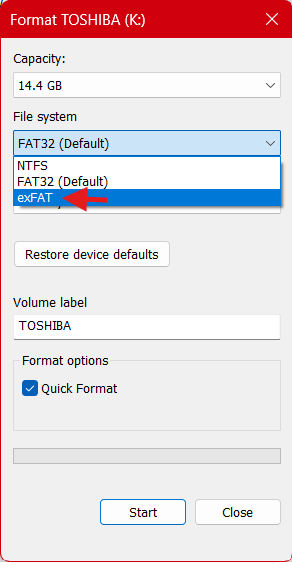
- Now from the file types, choose exFAT.
- Keep the quick format option checked and then click Start.
Did you format the flash drive by mistake? Read our article Best File Recovery Software
Did you find the article useful? Let us know your opinion in the comments.