Contents
WhatsApp has long been recognized as the world’s largest free instant messaging platform since Meta acquired it. Despite the emergence of some paid features aimed at businesses within business versions (WhatsApp Business), personal accounts remained completely distant from any financial subscription model.
Today, the app witnesses an unprecedented historic transformation, with the introduction of an entirely new feature called “Subscriptions”, which offers for the first time a paid version for regular accounts named WhatsApp Plus.
This shift redraws the competitive landscape with apps like Telegram (Telegram Premium) and Snapchat (Snapchat+), where Meta aims to provide exclusive customization features and software upgrades for users looking to distinguish their daily experience for a low monthly subscription.
In this article, we take a detailed look at everything you want to know about the new WhatsApp Plus subscription, starting from how to access it, through all available exclusive features, to pricing and trial details.
Read: Logging into WhatsApp Web on PC from Google
How to Find the Subscriptions Option (WhatsApp Plus) in Your Account?
Meta has elegantly and directly integrated the subscription option into the official app menus, and users who receive the update can find it by following this path to subscribe for free for the first month:
- Open the WhatsApp app and tap the menu button (⋮) and select Settings.
- You will notice a new dedicated section called Subscriptions.
- When you tap on it, the WhatsApp Plus subscription will appear; tap on it.
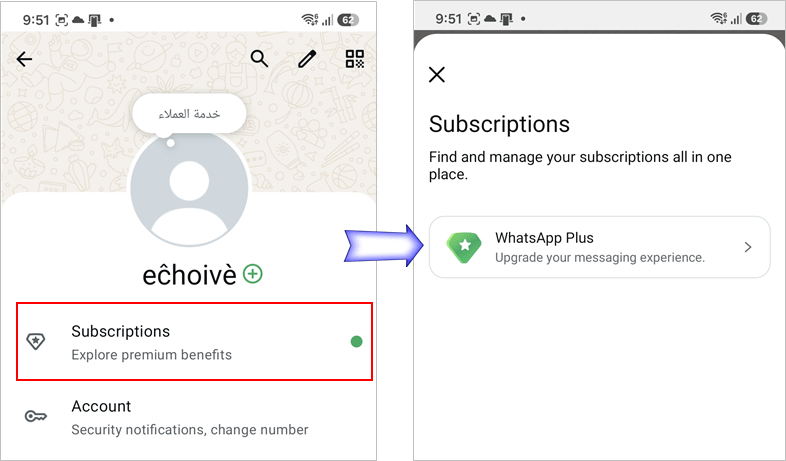
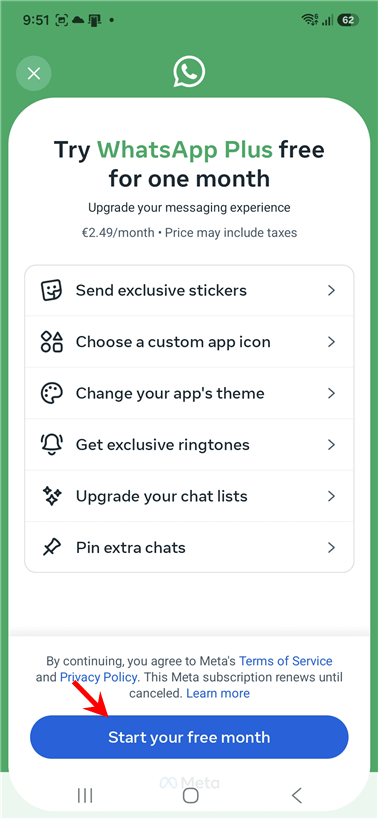
- You will immediately be taken to the WhatsApp Plus interface that showcases all exclusive features. Tap the Start your free month button.
- After that, the payment page will appear. You need to choose a payment method (You will not be charged for the first month). Press the Subscribe button.
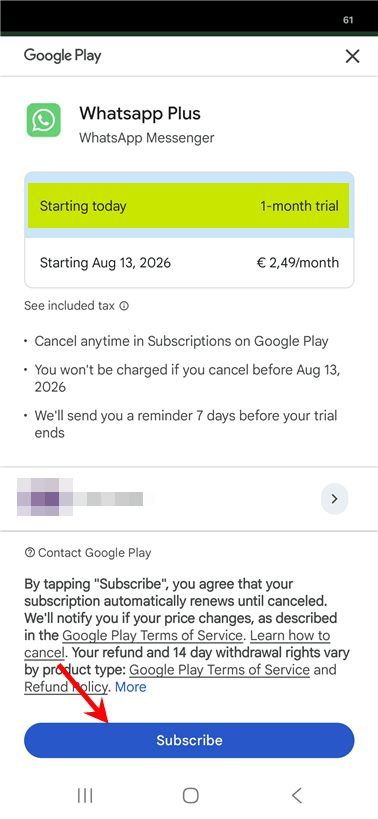
Note: Since the first month is free, you can cancel anytime before the month ends without paying a single penny. Essentially, the subscription is free. However, you must secure a payment method to fill in the information.
Read also: Download a second WhatsApp on the same device Samsung or iPhone or Huawei
Exclusive Features and Capabilities of WhatsApp Plus Subscription
When entering the subscription interface, Meta outlines six key pillars aimed at enhancing the messaging experience and making the app more flexible and personalized. Here is a detailed analysis of WhatsApp Plus features:
1. Send Exclusive Stickers
Stickers are one of the most popular means of expression in conversations. With the new subscription, the app grants you access to unique and exclusive sticker packs that are constantly updated. These stickers are designed with animated and interactive graphics to make your conversations more enjoyable and differentiate them from regular users.
2. Choose a Custom App Icon
For the first time officially and without the need for external launcher apps or custom themes for phones, the WhatsApp Plus subscription allows you to change the external app icon on your phone’s home screen. You can choose from a variety of exclusive shapes and colors to make the app unique and match your personal taste.
3. Change Your App’s Theme

The customization feature has been one of the major demands of users over the years. The theme customization option allows control over the overall colors of the app interface; you can change message bubble colors, internal icon colors, in addition to screen backgrounds. This gives the app a contemporary and fully personalized look that goes beyond the traditional light and dark mode options.
4. Get Exclusive Ringtones
To add a unique auditory character, the subscription offers a vast library of special and innovative ringtones and notification sounds. These ringtones help you identify incoming WhatsApp calls and messages immediately upon hearing them, providing you with a distinct auditory identity in your environment.
5. Upgrade Your Chat Lists
If you’re struggling with conversation clutter and finding it hard to access what’s important to you, the “Enhanced Lists” feature provides you with an intelligent organizational solution. This feature allows you to categorize and filter your chats based on your priorities (e.g., work, family, friends) in a deeper and smoother way than the basic options currently available, enhancing your productivity and preventing important messages from being lost.
6. Pin Extra Chats
In the traditional free version of WhatsApp, the limit for pinning conversations at the top of the screen is only 3 chats. However, with the WhatsApp Plus upgrade, the app breaks this limitation and allows you to pin more important conversations at the top of the chats tab, making it easier to quickly access groups and people you interact with most daily.
Read also: Block a WhatsApp number permanently and how to know if you are blocked
Pricing Details, Trial Period, and Cancellation Policy
Meta relies on a well-thought-out and attractive pricing strategy to encourage users to try the service without hesitation, and the financial subscription details are as follows:
- Promotional Offer: The platform offers a free one-month trial to evaluate the features before paying any amounts.
- Monthly Subscription Cost: After the trial month ends, the subscription cost is €2.49/month (the currency may vary or taxes may be added depending on the country and geographic store range).
- Flexibility of Cancellation: The subscription is fully managed via the Google Play store for Android users, and the company emphasizes that you can cancel your subscription anytime. No amounts will be deducted from your account as long as you cancel before the specified trial period ends.
- Smart Reminder System: As a transparency-building step, the app commits to sending users a reminder notification 7 days before the trial period ends to ensure that the subscription is not automatically renewed against the customer’s wishes.
Related: TikTok Web how to open TikTok from Google
Why Did Meta Turn to Paid Subscriptions?
Tech experts believe that the launch of WhatsApp Plus comes as a natural response to the remarkable success achieved by subscription models in competing apps. The Telegram application has successfully attracted millions of subscribers to its paid version by offering similar visual and organizational features.
Through this model, Meta ensures diversifying its revenue sources away from traditional advertising and business data by providing entirely optional added value to the user; the core messaging and calling features remain 100% free for everyone, while only those who wish to access advanced and aesthetic customization features will pay.
In summary: The WhatsApp Plus subscription represents a new era for the world’s most popular messaging app. If you are someone who loves visual distinction, and you seek professional organization for your daily conversations with special aesthetic touches, then investing a small amount like this monthly may entirely change your experience with the app.
Read also: Logging into Telegram Web from Google