Contents
Verifying accounts with the blue badge on Instagram has become a distinguishing mark that highlights credibility and increases the trust of both followers and advertisers. In light of the platform’s massive expansion and the multitude of accounts, obtaining this badge serves as official proof that the account represents a prominent public figure or a real and trustworthy brand.
In this detailed article, we will review the conditions and steps for officially requesting Instagram account verification, starting with the basic acceptance rules and criteria for merit, moving on to preparing the required documents, and finally to the steps for submitting the application and following up.
You may be interested: Log in to Instagram from Google – Instagram Web
Eligibility Criteria for the Blue Badge on Instagram
The blue badge is not automatically available to all accounts, but Instagram requires certain essential criteria to highlight the importance of the account and distinguish it from others:
- Authenticity: The account must belong to a real person or a registered entity (such as an organization or brand).
- Compliance with Policies: You must follow Instagram’s Terms of Use and Community Guidelines.
- Authenticity: The account should represent a real person, brand, or registered entity.
- Merit: The account should belong to a public figure, celebrity, or brand evaluated according to the platform’s verification criteria.
- Accuracy and Truthfulness: Provide accurate and non-misleading information and documents during the verification process.
Important Notes According to Official Documents:
- Make sure to choose the final username before applying; as the username cannot be changed once the account is verified.
- Using incorrect or misleading information during the verification process will lead to the removal of the blue badge and further actions that may result in account disabling.
- It is recommended to enable additional security tools like two-factor authentication after verifying the account.
Preparing Required Documents
Before starting the application process, you need to prepare the documents that prove your identity and credibility. Instagram typically requests the following documents:
Proof of Personal Identity
Such as a passport, national ID, or driver’s license. The picture must be clear and show all details completely.
Proof of Activity or Public Interest
You can provide links to news articles or radio or TV interviews that mention your account or your professional or personal activity. The more reliable external sources, the better your chances of acceptance.
Clear Display of Personal Brand
If you own a website or official blog, you can mention it among the documents to confirm your digital presence independent of Instagram.
You may be interested: How to Recover a Deleted Instagram Account
Steps for Submitting a Verification Request via the Instagram App
Instagram provides a simplified form within the app to submit a verification request. Follow these steps carefully:
Step 1: Access Account Settings
Open the Instagram app and go to your profile, then click on the icon that resembles three lines (☰) at the top right, and select “Settings and Privacy.”
Step 2: Submit Verification Request
At the bottom of the list you will find “For professionals” and under it, you will see Account type and tools ⬅️ Request verification.
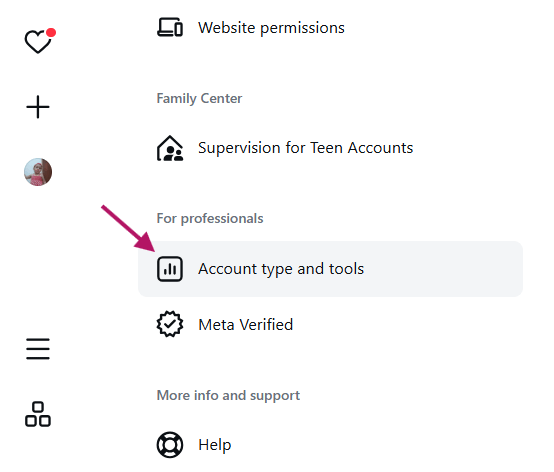
You will find the option “Request Verification“. Click on it to move to the form.
Of course, if your account is not professional initially, click on the switch to professional account Switch to professional account.
Step 3: Fill the Verification Form
- Full Name: Must match the official document.
- Job Title or Specialty: For example, “Professional Photographer” or “Travel Blogger”.
- Official Document: Attach a clear picture of the ID or required document.
- External Links: (Optional) Add links to sources that have talked about you or your activity.
It is preferable that these links are from journalistic sources and real independent articles (not paid ads) to support your acceptance chances and to prove “merit and fame”.
Check out: Solve the Issue of Messages Not Appearing After Enabling Encryption on Instagram
Step 4: Submit the Request and Wait
After ensuring the accuracy of the information, click “Submit“. You will receive a notification about the result of your application within a period ranging from several days to three weeks.
Follow Up on the Application Status and Respond to Feedback
During the waiting period:
- Ensure you continue your daily activity on the account (post new stories or posts).
- Check the message inbox and notifications regularly for any requests from Instagram for additional information or clarifications.
- If your application is rejected, review the reasons for rejection related to credibility or lack of documents, and try again after 30 days.
Additional Tips to Increase Your Chances of Verification Acceptance
Do not cease working on building a strong presence before or after submitting the verification request:
- Improve your bio and use keywords related to your profession or specialty.
- Adopt a valuable content strategy: educational videos, personal stories, or live tours.
- Engage with trustworthy accounts in your field, whether through comments or likes and reposts.
- Use relevant and appealing hashtags to attract new followers and potential visitors.
- Create a personal website or blog linked to your Instagram account to enhance your digital evidence of credibility.
Frequently Asked Questions About Instagram Account Verification
1. How long does it usually take for the application to be accepted?
The duration varies based on the volume of applications, but it typically ranges from 7 to 21 days. It is preferable to monitor notifications regularly.
2. What should I do if my application is rejected?
Review the reasons carefully, and work on improving the account activity: increase external media coverage and update documents if necessary. You can reapply after 30 days.
3. Can I lose the badge after obtaining it?
Yes, if you violate Instagram’s terms or if fake information appears in your account, the blue badge may be removed temporarily or permanently.
4. Do only accounts with a high number of followers get verified?
Numbers alone are not sufficient; Instagram focuses on authenticity, public impact, and information supported by external sources.
5. Is verification free?
Yes, Instagram does not charge any fees for verification. Any external paid offers implying a verification badge are fraudulent.
By following these criteria and focusing on building a real and trustworthy presence and media coverage of your activity, you can apply for free verification when your account meets the fame and merit criteria required by Instagram.
Check out: Best Time to Post on Instagram According to Algorithms 2026