Contents
With the increasing reliance on the Microsoft Edge browser for daily browsing, some users face the problem of high battery consumption and increased device temperature, which negatively affects the user experience and shortens battery life.
Our article today provides an explanation of the various steps and settings that can be followed to improve battery life and reduce heat when using the Edge browser, relying on the latest recommendations from recent trusted sources.
You may be interested in: How to Import Passwords and Extensions from Chrome to Edge
Common Causes of High Battery Consumption and Heat in Edge Browser
The issue of battery consumption and temperature increase in Edge browser is linked to several key factors, including:
- Having a large number of tabs running in the background without using the “Sleeping Tabs” feature.
- The presence of unnecessary extensions that continuously control CPU resources.
- Using heavy themes and wallpapers that contain animations or high-resolution backgrounds.
- Not updating the browser or operating system to the latest version, leading to errors in power management.
- Enabling some advanced features such as Hardware Acceleration on devices that do not support it well.
You may be interested in: How to Speed Up Edge Browser and Reduce CPU Consumption
Updating the Browser and Operating System to Reduce Battery Consumption
Regularly updating the Edge version and Windows or macOS is one of the first steps to ensuring better energy and heat management. Microsoft often releases updates that add performance improvements and reduce battery consumption. To check for updates:
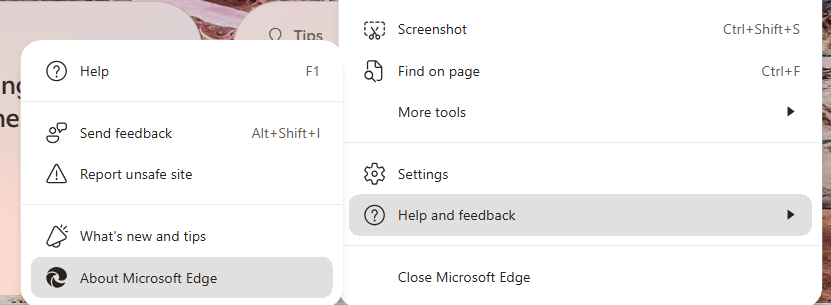
Go to the three-dot menu at the top of the browser, then select “Help and Feedback” and then “About Microsoft Edge”. (You can use the link directly in your browser edge://settings/help)
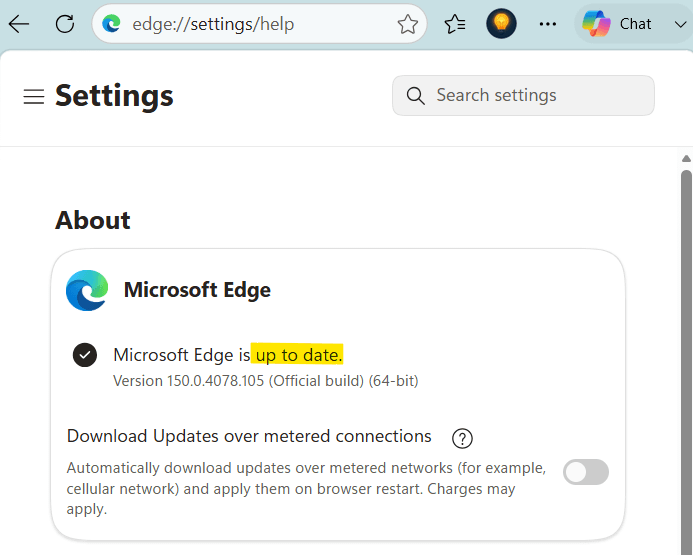
Edge will check for new updates and tell you that it is up to date. If not, a Update button will appear.
Click it and wait for the installation to complete and restart the browser.
It is also advised to install the latest operating system updates through Windows Update or update iTunes on macOS to ensure better compatibility between the browser and the operating system.
Disabling Unnecessary Extensions and Heavy Themes
Extensions significantly affect CPU usage, especially those that run in the background like password managers and monitoring tools. To reduce the load:
Open the extensions menu through edge://extensions, then disable every extension that is not essential or permanently delete it if you do not need it.
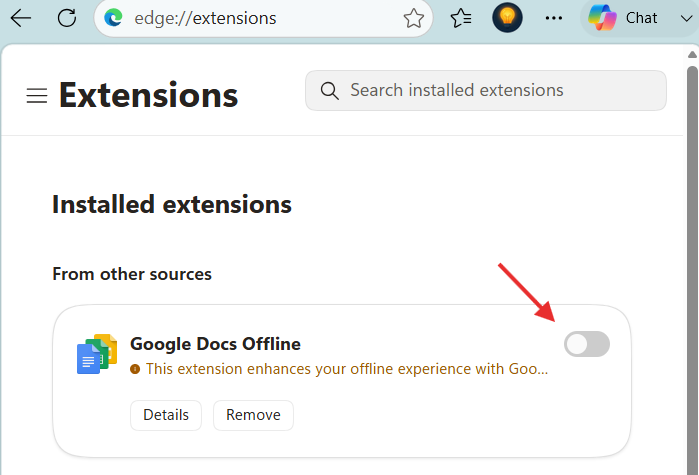
If you need some extensions periodically, consider installing them and enabling them only when needed, then disabling them immediately after use.
Adjusting Performance and Battery Settings in Edge
Enabling Efficiency Mode
The Microsoft Edge browser offers “Efficiency Mode”, which reduces background resource usage and curtails CPU consumption. To enable it:
Go to Settings >> System and Performance or navigate to the link (edge://settings/system/managePerformance).
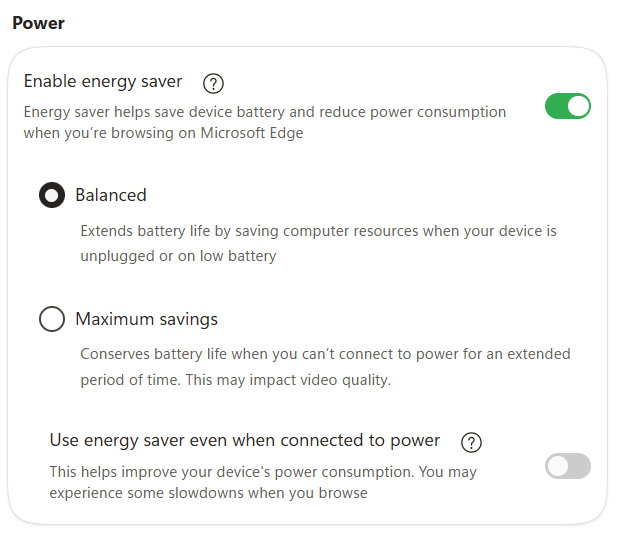
Then in the energy section, enable the option “Enable energy saver” when the battery is low or always. Enabling this option preserves battery when the laptop is not connected to power when choosing between two options:
- Balanced: Used to conserve laptop or computer resources when not plugged into power or when the battery is low.
- Maximum savings: Uses other means to preserve battery such as reducing video quality.
To use the energy saver option even when the laptop is plugged in, enable the option “Use energy saver even when connected to power” at the bottom.
Processor Usage Adjustment (CPU Throttling)
Limiting CPU usage in the browser can reduce heat. In the Performance section, you will find an option to adjust CPU usage; choose “Optimized” instead of “Unrestricted”. This setting helps lower energy consumption and prevents unnecessary overheating.
Turn Off Extensions When Closing Edge
Enter the System and Performance section, then in the System section or the link (edge://settings/system/manageSystem). Then do the following:
- Turn off the option Continue running background extensions and apps when Edge is closed.
- Disable the graphics acceleration option when needed Use graphics acceleration when available.
This option stops Edge-related extensions and applications from running after it is closed to conserve computer resources.
Saving RAM in Edge by Putting Windows to Sleep
Having a large number of tabs increases memory (RAM) and processor consumption, contributing to increased battery consumption and generating additional heat. It is recommended to:
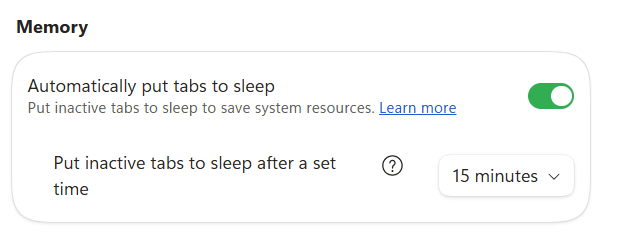
First, make use of the “Sleeping Tabs” feature that puts inactive tabs in a temporary hibernation that is restored when clicked.
To put inactive windows to sleep:
- Go to the System and Performance section, then Performance or the
edge://settings/system/managePerformancepath. - In the Memory section, enable the option to automatically put windows to sleep to save RAM.
- Change the time required to do so to less than 15 minutes if you want greater energy-saving options.
Second, avoid opening more than 10 tabs in the same session if you are working on a mid-range or low-spec computer.
Exceptions for Certain Tabs
You can benefit from the option Always keep these sites active:
You can add specific sites to this list to ensure they are not subject to any energy-saving actions or discarded, allowing them to remain active and update their data continuously without interruption.
Dimming Inactive Tabs
In the Performance section of Edge (edge://settings/system/managePerformance), you will find the option to Fade inactive tabs, which is a visual feature to organize the browser, where the tabs (Tabs) that you are not using become slightly dim in the top bar.
The purpose of this option is to provide you with a clear visual indicator of the open tabs that have been temporarily suspended to conserve device resources (memory and processor).
Taking Advantage of Dark Theme and Low Power Mode
Several studies have shown that switching to the dark theme (Dark Mode) helps reduce the screen’s power consumption, especially on OLED screens and laptops. To enable dark mode:
Open Settings then Appearance then select “Dark” under Theme.
You can also enable low power mode in the operating system from the power menu in the taskbar or battery settings on macOS, directing both the system and browser to work with fewer resources when battery levels are low.
Enabling PC Gaming Boost Feature
The Enable PC gaming boost feature is specifically designed for PC gamers. The browser automatically detects when a game is launched on your device and instantly reduces the browser’s CPU resource consumption, providing your game with the maximum possible performance and reducing lag.
Enabling Resource Controls
The Enable resource controls option is an advanced control tool that allows you to set a maximum limit on the browser’s random access memory (RAM) usage.
The Enable resource controls feature lets you choose the amount of memory allowed for the browser, which is highly beneficial to prevent heavy applications from slowing down the entire system, although excessively restricting it may relatively affect the browsing speed when opening many windows.
Monitoring Resource Consumption via Developer Tools
Edge provides Developer Tools for monitoring page performance and CPU and memory consumption. To open it, press F12 and go to the “Performance” tab. You can record a performance session and identify scripts or elements that consume excessive energy.
With this data, you can adjust page settings or disable specific scripts that increase the load on the system.
Computer and Driver Maintenance
The heat and battery consumption issue may be due to outdated drivers for the graphics and network cards. It is preferable to:
- Visit the graphics card manufacturer’s website (such as NVIDIA, AMD, or Intel) and download the latest drivers.
- Update charging and battery drivers in Device Manager on Windows for better power management.
- Ensure that the ventilation openings and fans in the laptop are clean to avoid dust accumulation that hinders cooling the components.
Additional Tips
For a more efficient experience:
- Use the original or manufacturer-certified charger to avoid charging issues that affect battery performance.
- Adjust video quality settings when streaming content from platforms to 720p or lower to lighten CPU usage.
- Try other lightweight browsers if all solutions fail, such as Vivaldi or Opera with energy-saving settings.
- Keep a backup of Edge settings and bookmark lists, so you can reinstall the browser and clean temporary data without losing important information.
- Regularly monitor the device’s thermal load through specialized software (like HWMonitor or Core Temp) to detect any abnormal increases in CPU or battery temperature.
By following these steps along with regular software and system updates, you can enjoy a smoother Edge browsing experience that is more economical in battery consumption and reduces heat, thereby prolonging the lifespan of your mobile device and maintaining its optimal performance.