Contents
Telegram is considered one of the most prominent instant messaging platforms preferred by users around the world due to its advanced features in privacy and security. However, the possibility of account hacking or spying remains if the user does not follow strong protection measures.
In this article, we will review practical and detailed steps to enhance the security of your Telegram account and prevent hacking and spying attempts.
Check out the article: Telegram Web Login from Google
The Importance of Protecting Your Telegram Account from Hacking and Spying
Many rely on Telegram to exchange personal, financial, and even professional information. With the evolution of cyberattack methods, securing the account has become an urgent necessity to maintain your privacy and the confidentiality of your data. Hacking a Telegram account can lead to the theft of messages, manipulation of groups and channels you manage, or even blackmailing friends and family.
Enable Two-Step Verification
Two-Step Verification is one of the most prominent additional security measures offered by Telegram. After enabling it, the app will not only rely on the code sent via SMS but will also ask you to enter an additional password of your choice.
How to Enable Two-Step Verification
Go to settings (found in the bottom strip with the gear icon), then “Privacy and Security”, and tap on “Two-Step Verification”. Then set a password.
Choose a strong password and try to avoid anything related to personally identifiable information. After activation, make sure you remember this password or keep it in a password manager.
Set a Strong Password for Account Recovery
Many users neglect the password for account recovery, leaving the door open for hackers to take over through SMS.
Characteristics of a Strong Password
It is recommended that the password consist of 12 characters or more, including uppercase and lowercase letters, numbers, and special characters. Common words or personal information such as birthdates or names of relatives should be avoided.
How to Manage Passwords
Using password management software helps you generate and save complex, secure passwords without needing to remember them mentally. You can rely on tools like LastPass or 1Password to ensure secure autofill when logging in on different devices.
Read Also: How to Transfer WhatsApp Chats to Telegram with One Click
Regular Review of Active Telegram Sessions
The “Active Devices” feature allows you to see all devices that are logged into your account. If you notice an unfamiliar device, you can terminate the session immediately to prevent any unauthorized access.
How to Monitor Active Devices
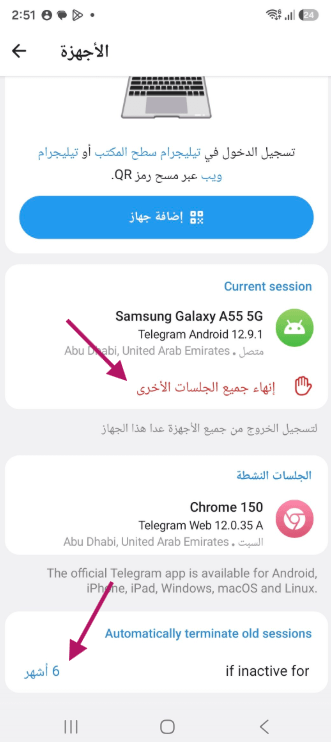
In Settings, select “Privacy and Security” then “Devices”. A list of devices will appear with their approximate location and the last active time. Terminate any session you do not recognize immediately.
Or you can perform one of two actions:
- You will find a list of Current Sessions and at the bottom, a button to Terminate All Other Sessions. Press it immediately.
- At the bottom, you will find the option for Auto Termination of Old Sessions under selecting the duration for terminating sessions (by default, 6 months).
Press it and choose for example 3 months or 1 week.
Using a Password for Protection (Passkey)
The Passkey feature in Telegram allows you to set a special password to open the app, preventing anyone else from intruding into your chats in case they gain access to your phone.
Steps to Enable Passkey
Go to “Settings” then “Privacy and Security”, and choose “Passkeys” or Passkey. Press the Create Passkey button.
Set a code consisting of numbers or letters as per your preference.
See Also: Solve the Issue of Not Receiving the Verification Code in Telegram
Deleting Sensitive Messages and Attachments
If you have communicated with parties or individuals with whom you do not wish to keep traces of conversations, use the feature to delete messages from both ends. You can also enable the “Secret Chat” which includes comprehensive and temporal encryption of messages.
Be Cautious of Suspicious Links and Files
Some attackers exploit fake links or harmful files to spread malware or steal your data. Always ensure the source of the link before clicking on it.
Signs of Dangerous Links: Suspicious links may have strange characters or seem to mimic the address of a well-known site but with slight differences. Clicking on shortened links from an untrusted sender should raise your caution.
Regularly Update the App and Operating System
Telegram periodically sends updates to patch security vulnerabilities and improve performance. Updating your operating system on your phone also reduces the risks of exploiting known vulnerabilities. Delaying updates leaves systems vulnerable to hacking.
Additional Tips to Enhance Your Account Security
In addition to the previous steps, we recommend the following to maximize your protection level:
- Turn off automatic chat backups to the cloud if they include sensitive data.
- Avoid unsafe public wireless networks, or use a trusted VPN when connecting to them.
- Avoid using the same password for multiple accounts, as hacking one may threaten all of your accounts.
- Enable security alerts to notify you when a new login to your account occurs.
Check out the article: How to Create a Telegram Channel and the Truth About Earning from Watching Videos
Frequently Asked Questions about Securing Your Telegram Account
How do I know if my Telegram account has been hacked?
Signs include messages appearing that you did not send, logins from unfamiliar devices, or changes to account settings without your knowledge. If you notice any of these symptoms, check active devices and change passwords immediately.
Can I recover my account after it has been hacked?
If your phone number or password has been changed without your consent, contact Telegram support via the official email providing as much information as possible to prove your ownership of the account.
What is the difference between regular chat and secret chat?
Secret chat uses end-to-end encryption and does not allow for message forwarding or taking screenshots of the chat. A self-destruct timer for messages can also be set after a specified time.
By following these steps and guidelines, you will be able to effectively secure your Telegram account against hacking and spying attempts. Cybersecurity is an individual responsibility that should not be overlooked by any user who values their privacy and the confidentiality of their information.