Contents
The “WhatsApp” application has undergone a radical transformation recently after “Meta” integrated its advanced intelligent assistant Meta AI, which is an AI bot for images and conversations among other important matters based on its family of large language models (Llama). This integration is no longer just an ordinary software addition or a limited experimental feature, but has become a qualitative leap that transforms the simple daily messaging application into a comprehensive productivity assistant capable of accomplishing hundreds of complex tasks in seconds without the need to leave your conversations.
In this article, we will practically and realistically review how to access this feature, its most prominent daily and professional uses, with a neutral analysis of the most significant drawbacks and privacy concerns, and answer the most frequently asked questions based on the latest stable updates.
See also: Solution for the problem of not receiving the WhatsApp activation code
How to Communicate with AI on WhatsApp
Meta has eliminated the old, complicated methods that required accessing account settings to activate the smart assistant. Today, AI is organically integrated into the application’s core user interface. You can access the WhatsApp AI bot through the following methods:
- Unified Search Bar (Colored Ring): When you tap on the search bar at the top of the chat list, you will notice a glowing circular ring in gradient colors (blue and purple). This is the quick entry for Meta AI; once you type your question or inquiry there, the assistant will start answering immediately.
- Independent Chat Icon
 : A floating button dedicated to Meta AI appears directly above the button to create a new conversation on the main screen of the application. Tapping this button opens a private chat window with the smart assistant, treating it as if it were a friend you consult at any time.
Features of the WhatsApp AI Bot for Images, Chats, and More
The capabilities of the WhatsApp AI bot go beyond simply answering general questions; it has been trained to be a flexible tool that supports productivity, creativity, and content creation. Here are the most notable features you can benefit from:
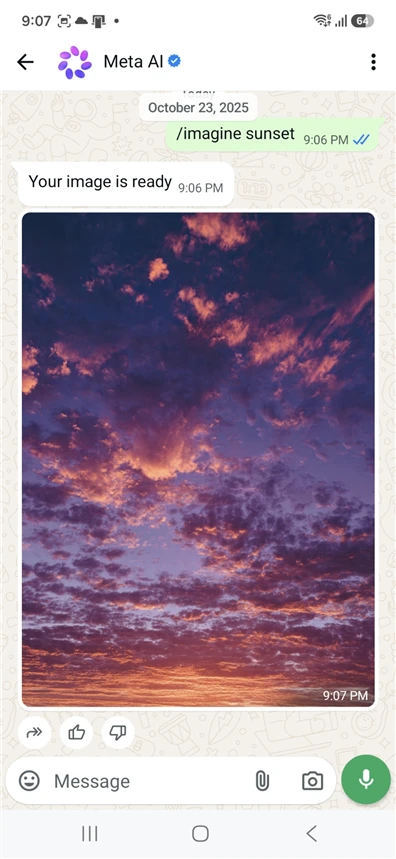
1. Generating Creative and Hyper-Realistic Images
One of the assistant’s strongest features is its ability to turn words into drawings and images with astonishing high accuracy. Once you enter the Meta AI chat and write the command for drawing (example: /imagine a modern laptop on a wooden desk overlooking the sea), the assistant will create the image for you within seconds. Not only that, but you can request modifications to specific details in the resulting image directly through the chat.
2. Content Creation and Professional Writing
If you are a content creator, marketer, or employee needing to draft official messages, Meta AI can assist you with:
- Writing professional emails with a formal tone.
- Drafting engaging posts for social media platforms with suggested hashtags.
- Writing and developing creative ideas, catchy titles, and scripts for short videos.
3. Smart Summarization and Text Analysis
When someone sends you a link to a lengthy article or a massive news report, you can simply copy the link and send it to Meta AI, asking it to summarize it. The assistant will read the content and extract the main points and key findings in just a few lines, saving you precious time from lengthy reading.
4. Instant Translation and Language Learning
The assistant supports multiple languages, including Arabic, with high efficiency. You can use it as a real-time translation tool for context or as a personal tutor for practicing languages, as it can correct your grammatical errors, explain the differences between terms, and offer tips for improving your language skills.
You might also like: WhatsApp Web Scan QR Code for iPhone and Android
Drawbacks of AI in WhatsApp
Despite the tremendous benefits provided by the smart assistant in WhatsApp Meta AI, its use is not without challenges and drawbacks that have been addressed in reports and reviews by global tech websites such as Wired and TechCrunch:
Privacy and Security Concerns
Since your conversations with the AI are processed and sent to Meta’s servers for improving and training the model, this raises legitimate concerns among digital security experts. Although your personal conversations with your friends remain protected by end-to-end encryption, the data you share with Meta AI itself is not encrypted in the same way, so it is strongly advised not to share any financial information, passwords, or sensitive personal documents with it.
The Phenomenon of “Hallucination” and Misinformation
AI models, including the Meta model, are prone to what is technically known as hallucination, which is the formulation of completely false information and presenting it in a very confident and convincing manner. Therefore, the assistant’s answers should not be taken as final references in medical, legal, or complex computational matters without verifying from independent and reliable sources.
Absence of a Complete Disable Feature
This point is considered one of the most annoying for users who do not prefer the presence of AI technologies in their daily applications. So far, Meta has not provided any option within WhatsApp settings to hide the colored ring or completely remove the feature from the app interface, imposing it as a permanent element in the search bar.
See also: 10 Secret WhatsApp Features that Many People Don’t Know
Guidelines and Tips for Safe and Effective Use
- Avoid Sensitive Data: Treat the assistant as a stranger; do not share your credit card numbers or confidential business information with it.
- Use it as a First Draft: Use the assistant to generate ideas, article structures, and summaries, but always add your human touch and expertise in final proofreading to ensure the quality of the content and its fluency.
- Verify Sources: When asking about historical events or precise scientific information, ask it to provide you with sources or search for them in traditional search engines to ensure their accuracy.
Read also: Send WhatsApp without saving the number: The fastest way to turn a number into a link
Frequently Asked Questions about the WhatsApp AI Bot
How can I activate AI in WhatsApp?
The AI in WhatsApp does not require any complex activation steps or code input; simply updating the app to the latest version automatically adds the WhatsApp AI Bot in your account as a colored circular ring in the top search bar or as a new chat icon that you can tap and start talking to immediately.
Is the WhatsApp AI Bot free?
Yes, Meta provides AI technology in WhatsApp completely free for all users currently. You can use the WhatsApp AI Bot to generate images, summarize texts, and answer inquiries without any fees or hidden subscriptions.
Can I find the WhatsApp AI Bot number?
The new AI system in WhatsApp does not rely on adding a dedicated phone number or saving a contact as in previous bots. Instead, Meta has integrated the WhatsApp AI Bot as a native and direct software service within the app’s interface, allowing you to access it at the push of a button without needing to save any numbers.
What is the difference between the new Meta AI feature and any other WhatsApp AI bot?
The other traditional bots found on the app are tools developed by third-party companies and are often limited or paid, while the AI in WhatsApp (Meta AI) is the official and secure assistant directly supported by Meta’s servers and built using the advanced Llama model to fluently understand Arabic and provide faster and more stable services.
Is AI in WhatsApp available for all phones?
Yes, the WhatsApp AI Bot is available on all platforms supported by the app, including Android and iPhone (iOS) phones, as well as the dedicated WhatsApp application for computers, as long as the operating system and application are updated to the latest version.
How can I delete my conversations with the WhatsApp AI Bot?
If you’d like to wipe your data history with the AI in WhatsApp, you can simply go to the main chat list, long press on the WhatsApp AI Bot chat, and select “Delete Chat”. This action will erase the entire history from your phone’s screen to protect your privacy.
In conclusion: Meta AI in WhatsApp represents a monumental step towards democratizing advanced technologies and making them accessible to everyone in a simple application. By understanding the capabilities of this tool and its security limits, you can transform it into a powerful digital companion that enhances your daily and professional productivity with unprecedented efficiency.
Related: Method to transfer WhatsApp chats from Android to iPhone for free