Contents
With the widespread use of WhatsApp among users around the world, the need sometimes arises to edit a message that was sent by mistake or to include additional details after sending. Until recently, the only option available to users was to delete the message entirely, which caused some confusion in the context of the conversation.
However, thanks to recent updates, you can now edit the text of the message and correct it without needing to delete it, providing greater flexibility and reducing the embarrassment caused by typos or incomplete information.
In this article, we will detail how to edit sent messages in WhatsApp on Android and iPhone devices, in addition to clarifying the conditions and restrictions related to this feature, its practical benefits, and tips for using it professionally.
Check out the article: Solution for not receiving WhatsApp activation code
History of the Message Editing Feature in WhatsApp
WhatsApp officially announced the launch of the message editing feature in 2023, a move that came in response to millions of users’ requests who experienced making typographical mistakes or sending incorrect information.
Prior to the launch of this feature, the common practice was to use the “Delete for Everyone” option and rewrite the message, which left a distorted impact on the context of the conversation and raised the recipient’s curiosity.
This feature is part of Meta’s ongoing strategy to enhance the user experience and bridge the competitive gap with other messaging applications, and it has been widely followed and analyzed by major global tech platforms such as WABetaInfo and TechRadar.
Steps to Edit a Sent Message in WhatsApp
To edit a message previously sent in a WhatsApp chat, you can follow these simple steps. These instructions apply to the official WhatsApp app on smartphones, as well as the WhatsApp Web and Desktop versions:
1. Open the Target Chat
Start by opening the WhatsApp app on your device, and then navigate to the individual or group chat that contains the message you wish to edit.
2. Long-Press the Message
On smartphones (Android and iPhone), long-press the message in question until it is selected and a menu of options appears. For WhatsApp Web or the Desktop version, right-click on the message.
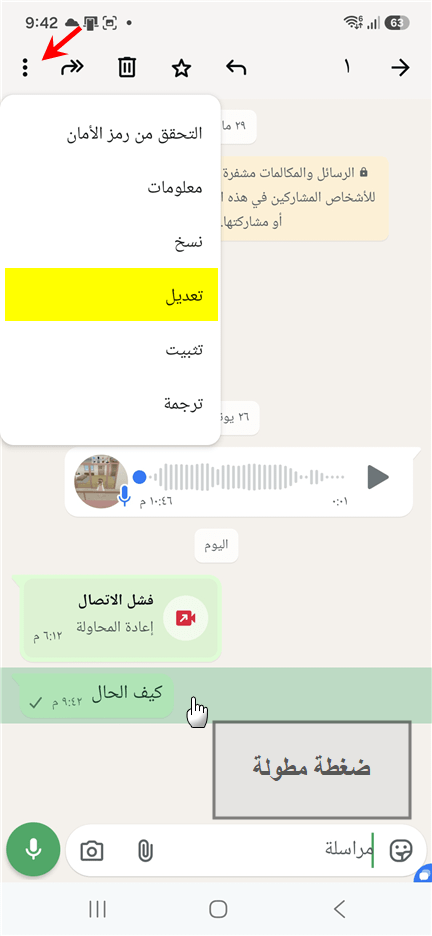
3. Select the “Edit” Option
From the dropdown menu, tap the “Edit” button (on Android phones, you may need to tap the three dots at the top first to display the option). The app will open a writing box again with the original text ready for editing.
4. Modify the Text and Format It
Make the necessary adjustments, whether correcting spelling mistakes, adding new details, or removing parts of the original text.
5. Save the Edit and Send It
After finishing, press the green checkmark or the regular send button. The app will update the message immediately for the other party, showing the edited text along with the label “Edited”.
Check out: sending WhatsApp message without saving the phone Number.
Conditions and Restrictions for Using the Message Editing Feature
Despite the ease of using the feature, WhatsApp has placed some technical restrictions to ensure the credibility of conversations:
• Time Limit: You can edit the message within a maximum period of 15 minutes from the actual sending time. Once this period has elapsed, the edit option disappears completely and the message becomes unchangeable.
* Fixed Edit Label: The term “Edited” appears next to the message to let the recipient know that the content has been changed, ensuring transparency in the dialogue.
* No Annoying Notifications: When you edit the message, the other party will not receive a new notification sound or vibration; the text quietly updates on the screen.
* Privacy of Edit History: WhatsApp does not allow the recipient to view the old text before editing, nor does it show them the exact time you edited it, thus preserving the privacy of your mistake completely.
Benefits of Editing Messages in WhatsApp
The editing feature provides significant practical value for users, contributing to improving the quality of daily communication:
1. Maintaining Professionalism in Correspondence: It allows employees and business owners to quickly correct numbers, dates, or grammatical errors before they lead to deeper misunderstandings with clients.
2. Continuity of the Dialogue Context: Instead of disrupting the chat sequence with annoying phrases like “This message was deleted,” the conversation remains clean and logically sequenced.
3. Saving Time and Effort: It streamlines the steps of complete deletion and re-writing lengthy sentences from scratch due to a single incorrect character.
Also read: How to Transfer WhatsApp Chats from Android to iPhone for Free
Additional Tips for Optimal Use of the Edit Feature
• Do not drastically change the meaning: It is preferable to use the feature for corrections rather than completely changing the context of promises or statements in serious discussions, to earn the other party’s trust.
* Update the app for both parties: To ensure the edit appears successfully, the WhatsApp app must be updated for both you and the recipient; very old versions may not support text replacement programmatically on their screens.
* Speed is key: Since the limit is only 15 minutes, get your eyes used to quickly glance at the message right after sending it to catch any errors before it’s too late.
Frequently Asked Questions
Can I edit the message after more than 15 minutes?
No, WhatsApp’s security policy strictly adheres to the 15-minute limit. Once this time has passed, you will not find the “Edit” option, and your only choice for correction is to delete the message entirely or send a corrective follow-up.
Can the recipient see the original text before editing?
No, the WhatsApp application does not provide any “edit history” feature. Once you press save, the old text disappears completely from the app’s servers and from the recipient’s screen, replaced by the new text.
Is the feature available in groups?
Yes, the feature works efficiently in both individual and group chats, and all group members can see the message after it has been edited.
You may be interested: WhatsApp Web: Clear the QR code for iPhone and Android
Conclusion
The message editing feature in WhatsApp has successfully provided an intelligent and practical solution to one of the biggest daily problems in digital communication environments. By giving users the ability to rectify mistakes and update vital information instantly, conversations have become smoother and more professional.
We recommend that you always check your app to ensure it is updated to the latest version to guarantee the feature works with all its security and practical benefits.