

Contents
Many iPhone users suffer from storage depletion due to what is known in the device settings as “System Files or System Data (Other),” which includes temporary files, app content storage data, and other files that are not displayed under photos, videos, or traditional apps.
In this article, we will review a series of effective methods for deleting these files and freeing up additional space on your phone, with a comprehensive explanation of each step supported by references from trusted sources.
What is System Data on iPhone
The System Data section (or Other in English versions) appears in the storage settings under Settings > General > iPhone Storage. This category includes:
- Temporary system files caches.
- Error logs.
- Application support files.
- Temporary media streaming buffers.
Over time, with the use of apps, watching videos, and browsing the internet, these files accumulate and can reach several gigabytes, so it’s important to be aware of and manage them regularly.
Ways to Delete System Data Files and Free Up Space
1. Review and Manage Temporary Data in Apps
Some apps like “Instagram,” “Telegram,” and “WhatsApp” offer internal settings to clear cache and free up space. For example:
- In Telegram: Settings > Data and Storage > Storage Usage > Clear Telegram Cache.
- In WhatsApp: Settings > Storage and Data > Manage Storage > Review and Delete Items.
This way, you can delete unnecessary files without removing the entire app.
2. Clear Safari Browser Cache
The Safari browser generates a large amount of cache and cookies. To delete them:
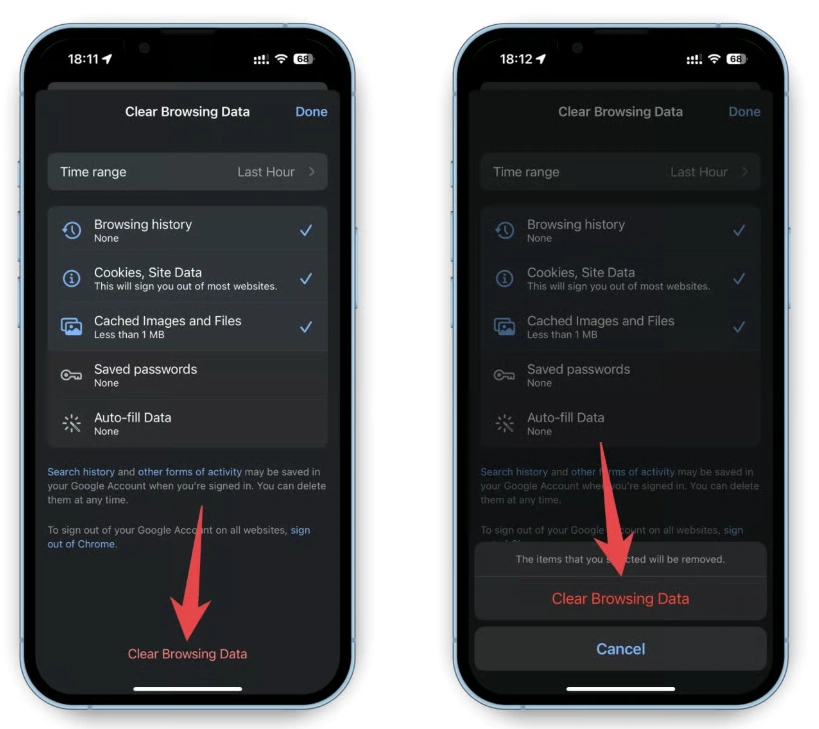
- Go to Settings < Safari.
- Tap “Clear History and Website Data.”
- Confirm the action by tapping “Clear History and Data.”
This will remove cookies and cache files from the websites you’ve visited, helping to reduce the size of System Data.
3. Delete Large Messages and Attachments
Images, videos, and audio files often accumulate within the Messages app, which increases the size of Other. To get rid of them:
- Open Settings > General > iPhone Storage > Messages.
- You will find sections like Photos, Videos, and GIFs & Stickers.
- Tap on each section to delete the largest or unimportant attachments.
You can also set messages to delete automatically after 30 days or a year through Settings > Messages > Keep Messages.
4. Reinstall Apps and Clean Data
Some apps do not provide an option to clear cache internally, so you can:
- Long-press on the app icon on the home screen.
- Select “Remove App” then “Delete App.”
- Re-download the app from the App Store.
This will remove all accumulated temporary data, and your saved data will remain in the cloud if the app supports backup.
5. Use the Offload Unused Apps Feature
Apple offers the option to offload unused apps while keeping their data:
- Go to Settings > General > iPhone Storage.
- Enable Offload Unused Apps.
When space runs low, the system will remove the app itself while retaining its documents and data, and the app will reappear once reinstalled with a single tap.
6. Regularly Update the System
Apple may release iOS updates that include improvements for managing storage and caches. To ensure you have the latest version:
- Go to Settings > General > Software Update.
- Download and install any available updates.
Updates sometimes support the regrouping and removal of temporary system files that are corrupted or unnecessary.
7. Backup and Restore the Device
If the space occupied by System Data is large and the previous methods do not fully help, you can resort to:
- Backing up to iCloud or via iTunes/Finder on your computer.
- Selecting Erase All Content and Settings from Settings > General > Reset.
- Restoring the backup after restarting the device.
Most temporary files will disappear and your personal data will remain intact.
Tips for Freeing Up Space on iPhone
To keep your device clean and avoid future accumulation of System Data:
- Review storage once a month in the iPhone Storage settings.
- Delete unused apps immediately after finishing with them.
- Use cloud streaming services (like Apple Music and Netflix) instead of saving files locally.
- Reduce video recording quality in the background if you do not need high resolution all the time.
- Enable the Optimize Photos option in iCloud Photos settings to store the high-quality copy in the cloud and reduce the local storage.
Frequently Asked Questions about Deleting System Files
Deleting temporary files does not affect the core iOS system, but rather helps to free up space and improve app loading speeds due to available storage.
It is recommended to review storage and clean temporary data every 4–6 weeks or when available space is running low.
Apple generally avoids apps that claim to drastically free up System Data for security reasons. It is advisable to rely on built-in iOS tools and the manual deletion methods we mentioned.
It is impossible to completely stop the formation of temporary files due to the nature of the system and applications, but following the above tips significantly reduces their accumulation.