
Contents
WhatsApp is one of the most popular chat applications in the world, but many users are only familiar with basic functions such as sending, receiving, and calling. There are very advanced features – some related to security, others to organizing conversations, and some for customization – that many people do not know about and will change your perspective on the app.
In this article, we present 10 of these advanced features that might change your experience with WhatsApp.
1. Backup Encryption Using Passkey
WhatsApp saves a daily backup of chats on your phone. This backup is now fully encrypted.
One of the latest security developments is that WhatsApp now supports backup encryption using Passkey — meaning you don’t need a long password, but you can use a fingerprint, face recognition, or screen lock code to protect your chat history.
This feature provides additional security: even if the phone is hacked or moved, the encrypted backup will only be opened with biometric authentication or device code.
2. Advanced Privacy Option to Prevent Exporting Chats
WhatsApp is testing a feature called “Advanced Chat Privacy” that allows you to prevent people from exporting chat history or automatically saving media to the photo gallery. This is very useful if you want to keep your chat content very private and ensure that the files you send are not stored permanently on the other person’s phone.
However, some may see this update as additional restriction.
3. Lock Specific Chats with Fingerprint or Code
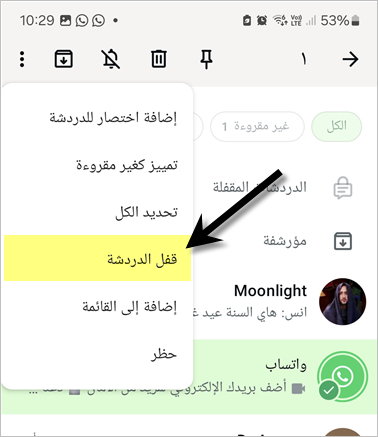
The Chat Lock feature allows you to lock specific chats within WhatsApp. You can secure them with a fingerprint (or code) so that no one can access those chats without your permission.
With this tool, you can keep your sensitive chats in a private and secure place within the app, without the need for external applications.
To activate chat lock: from the chat list (without entering the chat), long press the chat you want to lock until it is selected. Then click on the menu button and choose Lock Chat.
4. Use WhatsApp Account on Multiple Devices
Although many people know about “WhatsApp Web“, the multi-device linking feature allows you to use the same account on more than one device: a second phone, computer, tablet — without needing to keep your primary phone always connected to the internet.
The Multi-Device feature is very useful for those who manage a professional and personal account on the same number or for those who want to access WhatsApp from multiple devices simultaneously.
5. Messages that Disappear Automatically After a Period
WhatsApp supports the disappearing messages feature: you can set a chat to make messages disappear after 24 hours, 7 days, or even 90 days, depending on your settings.
This feature is very useful if you are exchanging sensitive temporary information, or if you are in a dictatorship and fear talking about even the weather. It’s also very useful in preventing old conversations from accumulating permanently on your devices, which will take up a lot of storage on your phone and it will be difficult to delete since WhatsApp does not allow a lot of conversations to be selected for deletion.
To activate this feature for a chat, enter your chat with the desired person. Press the menu button. Then select disappearing messages. And choose the appropriate duration.
This feature can be activated for all chats, but we do not recommend that.
6. “View Once” Messages
The View Once feature allows you to send photos or videos that the recipient can view only once before they disappear. This feature is extremely useful when sharing temporary or sensitive content, such as an activation code, a private photo, or confidential data — leaving no trace after the first view.
To send a View Once message, follow these steps:
- Open any chat and click on the file or photo sharing button.
- After selecting the photo, click on the
 icon.
- After that, the send button will turn green
 .
However, you should pay attention to the following points regarding disappearing messages:
- The other party can record the audio message you send using the phone’s internal recording even if it is viewed once.
- The screen can be recorded, so if you send a video clip or a photo, the other party can start screen recording before opening the message.
- Disappearing messages remain for a while on the WhatsApp server since, like other messages, the other party can report them so that WhatsApp can review reported messages. (source WhatsApp)
7. Screen Sharing in Video Calls
A not widely known but powerful feature: you can share your phone or device screen during WhatsApp video calls. This is useful in many cases: presenting a presentation to a colleague, explaining a setup to a friend by sharing what you see on the screen, or even watching something together in real time.
8. Message Drafts
WhatsApp has begun to provide the message drafts feature: any messages you start typing and stop before sending are automatically saved as a draft, and you can resume them later. This feature is important for those who text a lot but may get interrupted while writing, so instead of losing what you’ve written, you can easily continue it later.
9. Deleting Large Files
Among the advanced features for managing space: you can go to Settings → Storage and Data → Manage Storage and view files by the most used chats, then delete large or unnecessary images or videos only.
This way, you can free up significant space on your phone without deleting the entire conversation, but only deleting heavy or unimportant media.
10. Usernames + Hiding Phone Number (Coming Soon)
WhatsApp is testing a feature that allows users to create unique usernames instead of relying only on phone numbers, as privacy reports have stated.
This feature provides an additional level of privacy: you can share your display name with people without fully revealing your number. Especially for those who prefer to separate their real identity from their phone number when using messaging or groups.
Why Are These Features Important?
These advanced features reflect how WhatsApp has evolved to become not just a simple messaging tool, but a powerful tool for managing security, privacy, and content organization. As digital risks increase, it is essential to know how to use these tools to our advantage:
- Security: Backup encryption and the export prevention option ensure that your data is protected even if you lose your device.
- Privacy: Chat locks and hiding phone numbers or using usernames help you keep your conversations confidential.
- Efficiency and Organization: Space management, using drafts, and screen sharing all help make the WhatsApp experience more productive.
- Flexibility: Linking multiple devices gives you the freedom to use WhatsApp from anywhere, without being restricted to one device.
If you didn’t know these features before, now might be the right time to check your WhatsApp settings and activate what suits your needs. You will find that your usage of the app becomes safer, more comfortable, and more efficient.
Tell us in the comments which features you were unaware of and which ones you have known for a while.