
Contents
Our article today is about creating a web page (site) using Google tools completely for free.
Have you ever dreamed of having a professional digital presence without incurring hosting fees or complicated programming? You might think that creating a website is a daunting and costly process, but the truth is that the search giant “Google” has put powerful and free tools in your hands that allow anyone, regardless of their technical experience, to build a web page that is fully integrated, ranging from a personal blog to an informational site for your company. We will take you on a detailed journey step by step, focusing on using the best Google tools to ensure that your new page is successful and optimized for search engines.
You can check out our encyclopedic article on “How to Improve Your Site’s Ranking on Google Search“. It includes the most crucial points in dominating search results that many website owners are unaware of.
Google Page Creation Tools
When we talk about creating a page or site on Google, we often refer to one of the two main tools that the company offers for free:
1. Google Sites
Google Sites is the easiest and most flexible platform for creating a professional web page for free. It is ideal if you need a multi-page site (such as an “About Us” page, a “Services” page, and a “Contact Us” page). The tool provides you with a simple drag-and-drop interface, ensuring that your page is responsive and looks great on all devices, be it a desktop or a smartphone. It’s a real workshop where you can design every part of your page with relative freedom.
2. Create a Google Business Profile
If your main goal is to create a simple page for your local business (restaurant, shop, or salon), then the Google Business Profile automatically provides you with a very basic web page constructed based on the information you add to your profile. While this tool is limited in customization, it is the fastest way to ensure that your page appears in local search results and Google Maps.
In our next steps, we will focus on Google Sites as it allows you to create a page with more depth and the details required for SEO purposes.
Steps to Create a Page on Google
Creating your page on Google requires only a bit of focus and some creative touches. Follow these detailed steps carefully to ensure the best possible outcome:
The necessary time: One minute (20).
How to create a page on Google Sites for free.
- Login and Start the Project
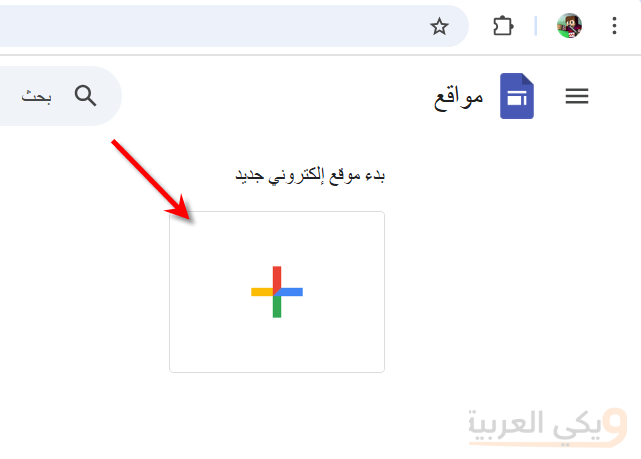
Start by visiting Google Sites and logging in with your Google account (this is a prerequisite to start, see How to Create a Google Account). After logging in, you will find the option “Start a New Site”.
- Choose the Page Title and Logo
Choosing your Google page title is a critical matter that you should have planned beforehand. In any case, you can write the website page title in the upper right corner as shown in the picture.
Below, write the title again and click on “Add Logo” and choose your page logo.
You can choose an image for your business or your logo.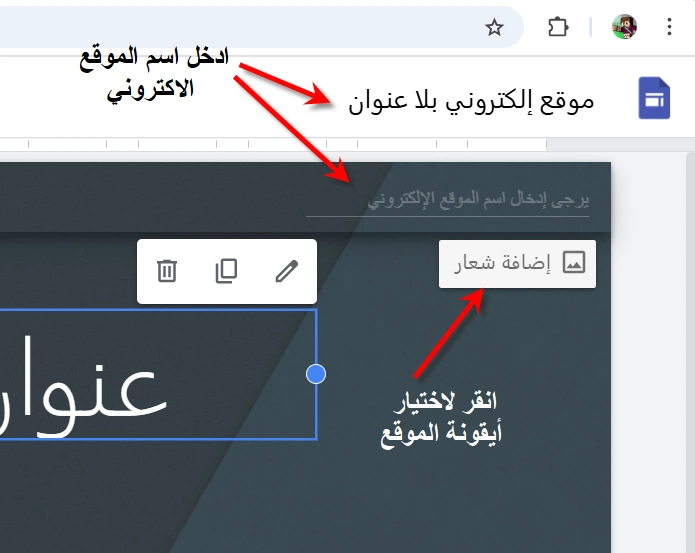
- Choose the Page Title
The page title expresses its content. Choose an appropriate title, this name will appear in browsers and search results. Note that there are some additional options for formatting the title and its background, called the banner.
By clicking “Image” you can upload the background image for the title.
By clicking “Title Type” you can choose from a wide variety of styles to place the image behind it.
As you write the title, a text formatting bar will appear, and there are many options such as font type and size…etc.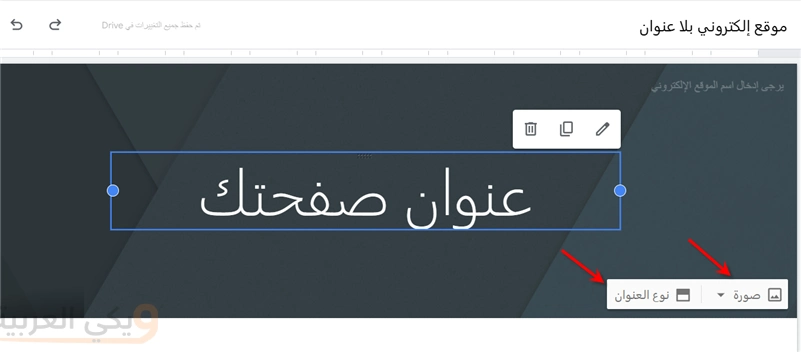
- Choose a Page Template
It is highly recommended to choose one of the ready-made templates. Ready-made templates provide you with a pre-designed and organized structure, saving you a lot of effort and time needed to design your page‘s basic layout.
On the left, you will find the appearance tab, where you will notice that the default appearance is “Simple“. The template allows you to change the color and font schemes. Colors should reflect your brand, and fonts should be clear and easy to read on all screens.
There are also other free ready-made templates like “Aristotle“, “Vision“…etc.
- Add and Format Content
This is the most important stage, where you begin to enter content that attracts visitors. Remember that the goal is to create a page that is useful and rich in information.
Drag-and-Drop Editor: Use the sidebar and select the Insert tab to easily add various elements:
Text Box: Add explanatory texts. After using this element, you can choose the text type, such as a title or regular text, and use subheadings (H2, H3) to divide the content and improve the SEO for your page.
Images: You can upload your photos or fetch them directly from Google Drive or Google Photos. Exclusive Content Tip: Make sure that the images you upload to support the article will be of high quality.
Interactive Media: Take advantage of the integration with other Google products; insert Google Forms to collect customer data, or Google Maps to locate your business, or Google Docs to display specific files. These additions make your page more interactive and valuable.
- Add Subpages and Link Them Together
A professional site is not complete with just one page. Use the “Pages” tab to create your site structure:
Create New Pages: Add pages like “About Service”, “Blog”, or “Portfolio”.
Build the Hierarchy: Arrange these pages in a logical sequence (i.e., place subpages under main pages). This hierarchy is very important to help search engines (and visitors) understand the structure of your page.
The Top Menu: The navigation bar (menu) in your page will automatically update with every new page you add.
To create a new subpage, go to the Pages tab in the sidebar and click the + icon at the bottom and select New Page.
A dialog box will open, choose the page name and then Done. Your new page will appear right away. It will show in the Pages list under the main page. You can see the available options, such as setting it as the main page or adding a subpage from it, cloning it, hiding it, or setting a custom link for it…etc.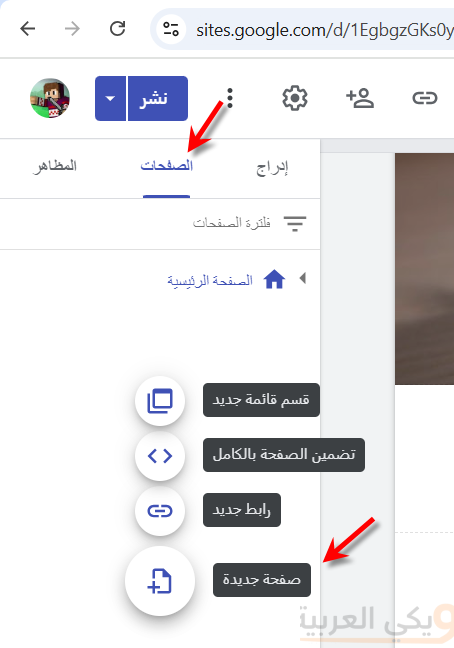
- Preview and Publish
Before you click the “Publish” button and make your page available to the world, there is a vital step that needs to be taken, which is optimization (SEO).
Final Preview: Use the “Preview” icon (Preview) shaped like a computer and phone in the top bar to see how your page looks on computers and mobiles. Make sure everything is as you want.
Publishing Settings (URL): Click the “Publish” button. A window will appear to choose a unique web address for your page (URL). Choose a short and clear title that reflects the content as much as possible (example:sites.google.com/view/amusingmath). A check mark will appear if the name is available.
Search Settings: Make sure that the option “Request that public search engines do not show my site” is not activated. To allow Google to index your page and have it appear in search results. It is not enabled by default anyway.
After completing these steps, click on “Publish“. Congratulations! You have just launched your very own professional web page live on the web.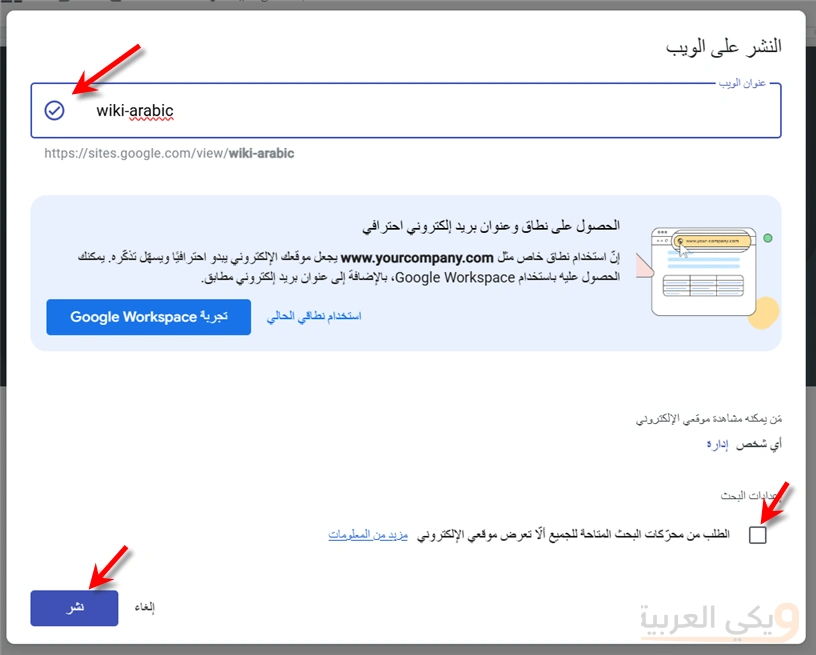
Managing the Website Page on Google (SEO Optimization)
The process of creating a web page is not the end, but rather the beginning of a long job. To make your page excel in search results (SEO), you must commit to ongoing maintenance and optimization, and you can follow these tips:
- Content First: Remember Google’s basic rule: “human-centered content first”. Your page must provide real value to the visitor. Regularly update your page‘s content, adding new articles or updated service details to prove to Google that your page is active and trustworthy.
- Internal and External Links: Link your site’s pages to each other (internal links). Additionally, add links to trusted external sources (other reliable websites). This helps distribute the power of the page among all sections of your site and enhances its credibility.
- Alt Text for Images: Every image you upload to your page must contain an alternate text description (Alt Text) that describes its content. This description is not typically seen by users, but it is vital for helping search engines understand the context of the image, thereby enhancing the performance of your page in image search results.
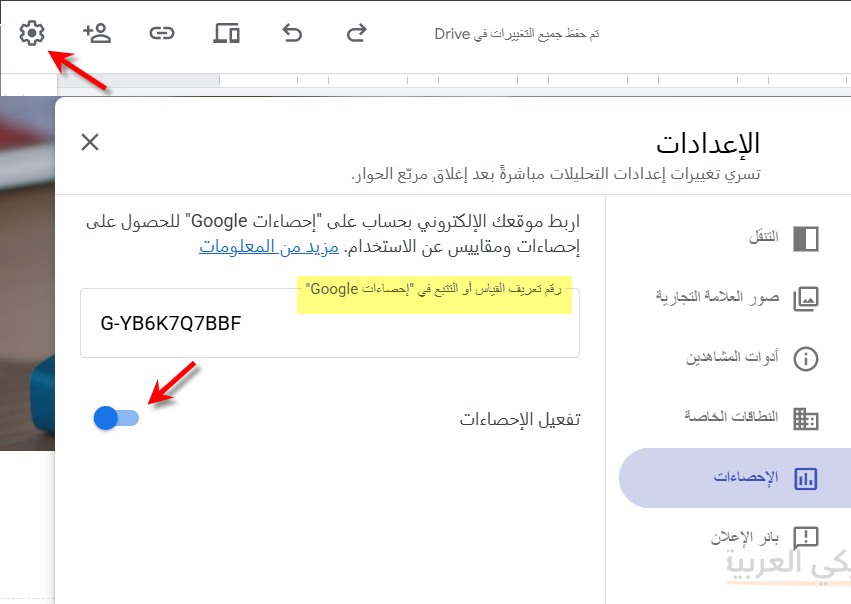
- Integrate Google Analytics: Although Google Sites provides simple reports, you should link your page with Google Analytics. This free tool gives you deep insights into the performance of your page, showing you the number of visitors, sources of traffic, and the most popular pages. This data is invaluable in the process of marketing decisions and improving user experience.
To activate the internal statistics, click on the settings icon in the top bar, then from the Statistics tab, ensure that the Enable Statistics flag is activated and blue.. To integrate with Google Analytics statistics, you need to paste the tracking code in the box shown in the picture.
Buy a Domain or Link a Domain with Google Site
Google Sites provides you with a site on the basic domain (domain) sites.google.com. It has very high authority and reliability. This is what some prefer as it will give you strength in appearing on search engines in general. Despite this, Google allows you to choose a domain of your choice.
All you have to do initially is to purchase a domain from any domain purchase service provider such as Godaddy, Namecheap, or Google itself. After purchase, open your site in Google Sites, go to the settings, and select the custom domains tab:
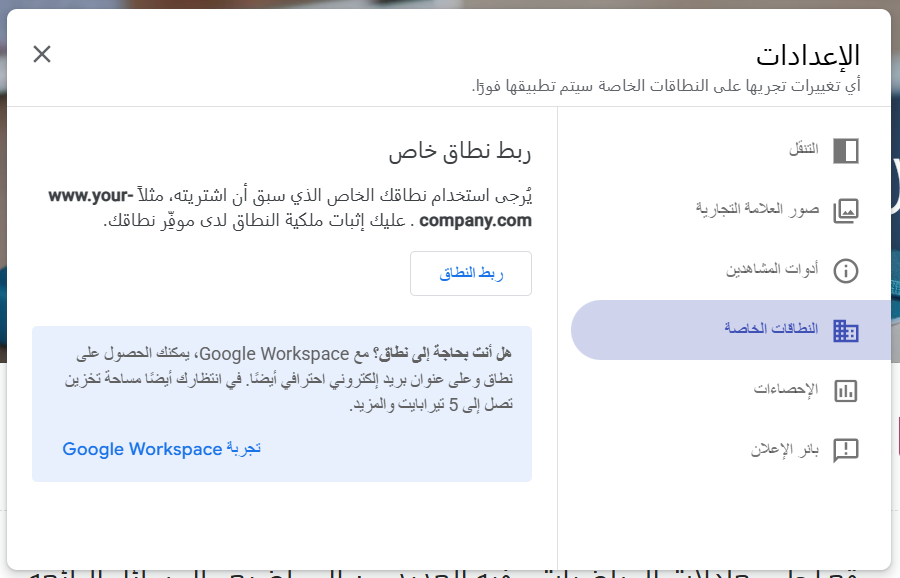
Then select link the domain. Then enter your domain and follow the steps that guide you to verify your ownership of the domain.
You may also be interested in: How to create a Facebook page on mobile
Building a page on Google using Google Sites is a smart and free option that puts you on the right track towards building a strong and effective digital presence. It requires just a little creativity and commitment to the correct steps.