

Contents
In a concerning security development, a massive breach targeting vast databases such as Gmail accounts and Yahoo among others has recently been announced, with data from 183 million Google accounts alone leaked! This has resulted in the exposure of millions of email addresses and their associated passwords. Although the breach itself occurred earlier this year (April), the official disclosure of the extent of the damage and the details of the leaked data only came a few days ago, putting the cybersecurity of millions of users at risk.
What Exactly Was Hacked?
The leaked data is a treasure trove for hackers, going beyond just email addresses. Commonly, the leaks include the following items:
- Email Addresses: They are the primary key for hacking and are used to direct subsequent attacks.
- Hashed Passwords: While the passwords are not exposed in plain text, the hashing can be cracked using advanced techniques if the password is weak.
- Usernames and Personal Details: In some instances, the leaks contain additional information such as names, birth dates, or even geographical locations.
The danger of this type of breach lies in the fact that many users rely on one password for multiple accounts. Once hackers obtain one pair of email and password, they can use it to breach other sensitive services, in what is known as “Credential Stuffing” attacks.
How to Check if Your Account Has Been Hacked Now?
To provide a quick and reliable tool for users to check whether they have been affected by this breach or other historical leaks, the Have I Been Pwned (HIBP) website is the best global resource.
What is Have I Been Pwned?
The https://haveibeenpwned.com/ website, run by Australian cybersecurity expert Troy Hunt, is a vast database that collects and indexes billions of leaked accounts from hundreds of disclosed breaches. The site is characterized by transparency and neutrality, and only requires you to enter your email address to check if it appears in any of the breached databases.
Immediate Verification Steps:
- Visit the site: Go directly to
https://haveibeenpwned.com/. - Enter your email: Place the email address you use in the designated box.
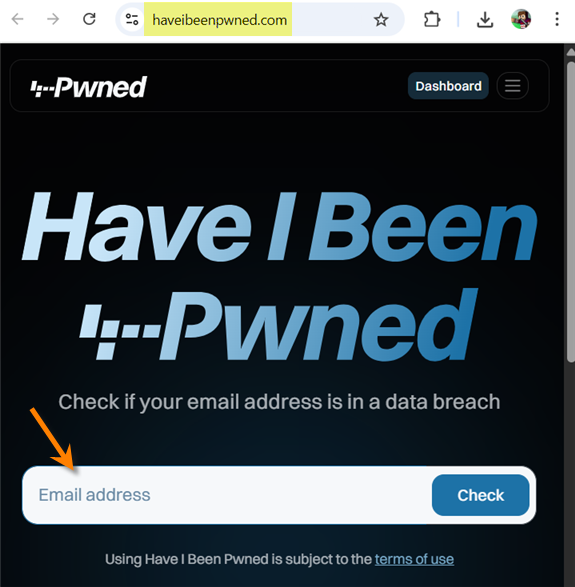
- Click on “Check?”: You will see an immediate result:
- Green: Means your email has not appeared in any disclosed breaches.

- Red (Oh no — pwned!): Means your email was part of one or more breaches. The site will list the details of the breaches you were affected by, when they occurred, and what type of data was leaked (passwords, names, etc.).

- Green: Means your email has not appeared in any disclosed breaches.
What Should I Do If My Account Has Been Hacked
If the HIBP site shows that your email has been breached, or even as a precautionary measure, you should immediately take the following steps:
- Change Your Password: Change the password for this email immediately to a strong and unique password (a mix of uppercase and lowercase letters, numbers, and symbols).
- Enable Two-Factor Authentication (2FA): Enable the two-factor authentication feature on the email and all other sensitive accounts (banks, social media). This feature requires an additional code from your phone, even if the hacker knows the password.
- Check Matching Accounts: Remember any other services (shopping sites, forums, tech services) where you used the same password as the hacked email, and change them all.
This event serves as a reminder to everyone that cybersecurity is not a luxury; it is a daily responsibility that requires vigilance and continuous updates to protective measures.