Share:

How to Use the Clipboard on iPhone

طريقة استخدام الclipboard في الايفون

Our article today is about how to use the Clipboard on the iPhone, how to find it, display it on the keyboard, view the copied items, and use it.

Smart devices continuously work to improve and facilitate user experience, especially in repetitive tasks, such as copying, pasting, saving passwords, and personal emails. Among these methods is the Clipboard, which is considered your personal clipboard that contains all the important items you have copied or keep for repeated use, such as emails, important images, or personal data.

What is the Clipboard?
What is Clipboard

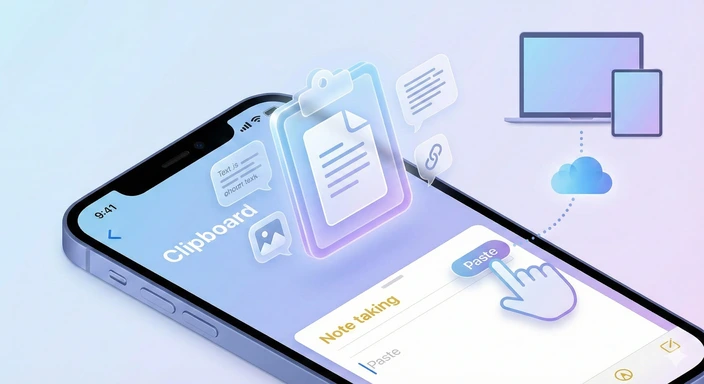
The Clipboard is a temporary draft where you can keep what you want, such as copying texts, messages, or important codes on your phone. You can keep your personal email, an important password, or even an important image that you need to refer to every now and then.

The Clipboard has evolved over the past years, no longer being entirely temporary or limited to just texts. You can keep what you want for as long as possible. However, despite this development, the iPhone still comes with a very primitive version of the Clipboard that only retains the text you copied once and gets deleted automatically when you copy new text. Additionally, it does not allow saving any images, links, emails, or passwords. Therefore, in this article, we will provide a simple and free method for having an advanced version of the Clipboard on your iPhone.

Check out Steps to Buy a Used iPhone

How to Activate the Clipboard on iPhone
SwiftKey Keyboard
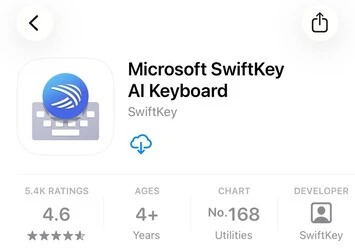
  1. We will use the advanced Clipboard on the iPhone via the Microsoft SwiftKey Keyboard. We will go to the App Store, search for SwiftKey, and then download it.
    Activating SwiftKey Keyboard on iPhone
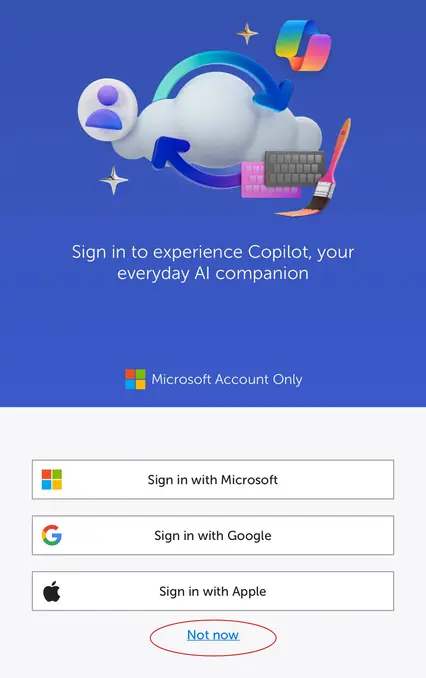
  2. Open the keyboard after downloading and tap Get Started. You can log in if you want or you can skip this step by tapping Not now.
    Using Clipboard on iPhone
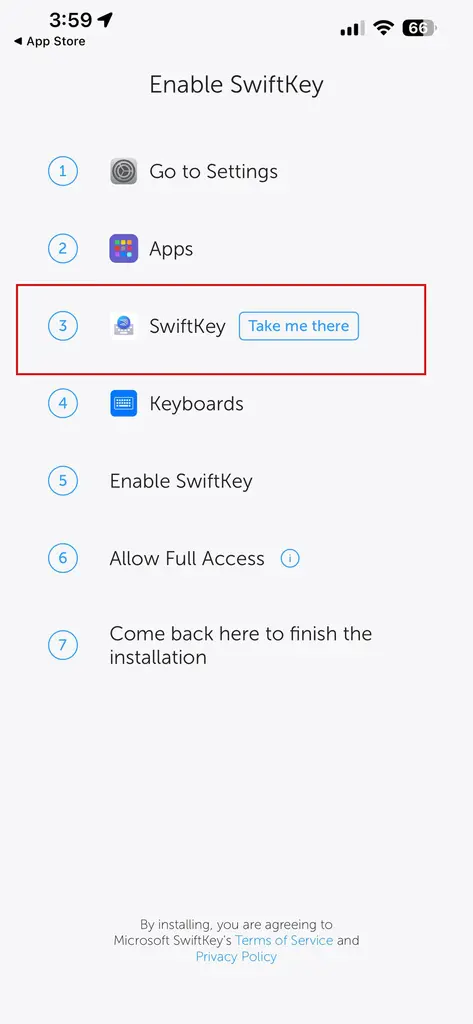
  3. You will need to set SwiftKey as the default keyboard from the settings. The app will guide you directly to the required settings, so in front of the third option, you will press Take me there, which will open the keyboard settings from which you will grant full permissions to SwiftKey.

Steps to Use the Clipboard on iPhone

Time needed: One minute (5).

How to benefit from the Clipboard for iPhone

  1. Select SwiftKey Keyboard

    Using SwiftKey Keyboard on iPhone
    Open any messaging or notes application, and using the iPhone’s keyboard, tap on the globe icon and then select SwiftKey.

  2. Access the Clipboard

    Using Clipboard on iPhone
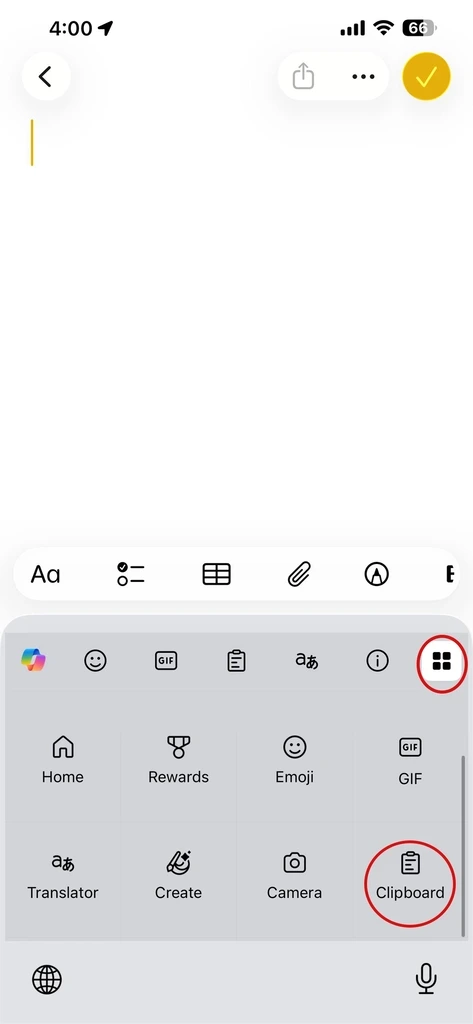
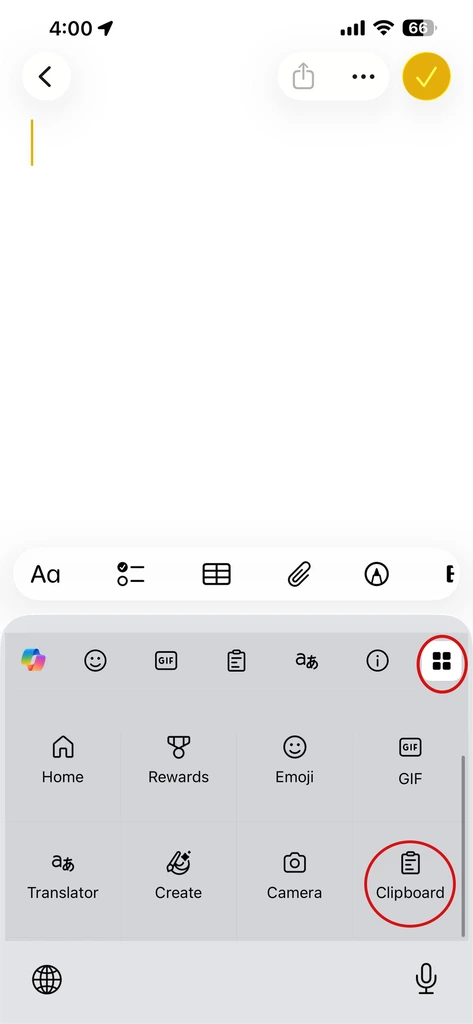
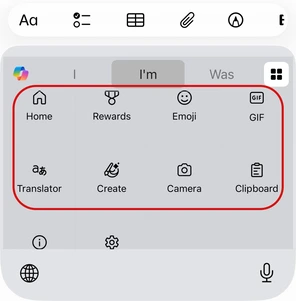
    The SwiftKey keyboard will appear directly. Tap on the options icon located on the right side of the keyboard, which will show you multiple tools, including the Clipboard option we need.

  3. How to Use the Clipboard

    Using the Clipboard on iPhone
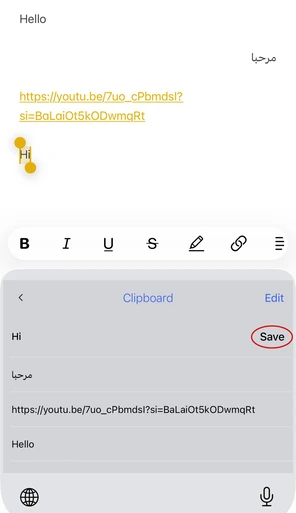
    When you copy any text, it will appear in the clipboard section with the word Save next to it. If you want to keep the text permanently, just tap on the word Save, and you will find it there every time you open the Clipboard from the keyboard as we mentioned.

Features of SwiftKey Keyboard for iPhone
Features of SwiftKey Keyboard

In addition to the Clipboard feature, which provides you with a more professional experience compared to the one available on iPhones with the system, SwiftKey keyboard offers many other excellent features compared to the basic iPhone keyboard. For example, you can pin the number row at the top of the keyboard for quicker access without the need to press the numbers and symbols key on the keyboard. You also have direct access to use Microsoft’s smart assistant Copilot, which provides you with another level of assistance with artificial intelligence and is a major competitor to ChatGPT. It can create images for you directly using DALL E, all from the SwiftKey keyboard directly.

Additionally, you have the translation button in front of you on the keyboard to use in any application or chat or while reading text in another language without having to open the translation app separately.
Clipboard Feature in Swiftkey Keyboard

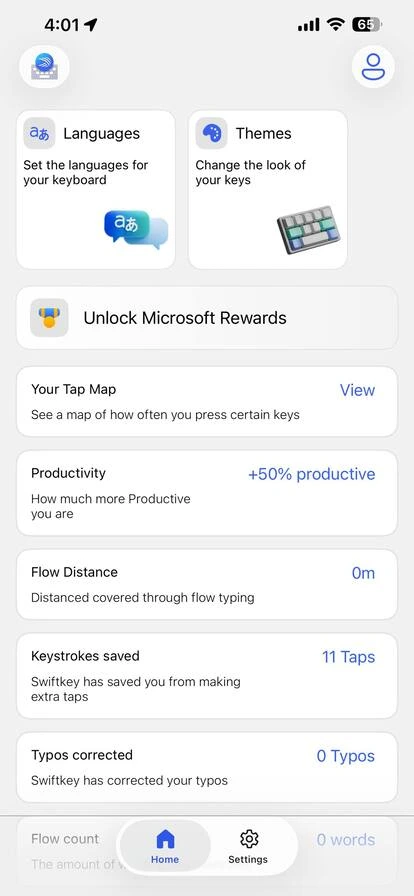
By going directly to the SwiftKey app, you can have greater control over the keyboard with different styles, shapes, and colors, enable various settings like auto-correction, and adjust the button vibration settings.

You may be interested in: Steps to Use Apple Apps on Windows

Conclusion

The SwiftKey keyboard helps you provide some missing features in the basic iPhone keyboard, which makes daily use easier and speeds up some routine tasks such as the Clipboard and saving all important information and retrieving it when needed, or the ease of using the keyboard from multiple shortcuts. So, share your experience with SwiftKey—was it exceptional? Or do you rely solely on the iPhone keyboard?


أكثر هواتف آيفون مبيعاً

إعلان الهاتف

آيفون 16 128 جيجابايت

آيفون 16 128 جيجابايت

يُقدم هاتف iPhone 16 تجربة ممتازة تجمع بين الأداء القوي والتصميم العملي، مدعوماً بمعالج A18 المصمم خصيصاً لدعم مهام الذكاء الاصطناعي (Apple Intelligence). ويأتي بشاشة Super Retina XDR زاهية، إلى جانب زر التحكم بالكاميرا الجديد (Camera Control) الذي يمنح المستخدمين وصولاً سريعاً وسلساً لالتقاط الصور والفيديوهات.

ملخص آراء أشهر المواقع التقنية

"معالج A18 القوي يوفر سرعة هائلة وأداءً سلساً للغاية في تشغيل التطبيقات والألعاب الحديثة دون أي تأخير."

TrustedReviews
★★★★★

"زر التحكم في الكاميرا الجديد يضيف لمسة عملية رائعة ومبتكرة تسرع من عملية التصوير باحترافية."

TechRadar
★★★★☆

"عمر البطارية شهد تحسناً ملحوظاً مقارنة بالأجيال السابقة ليصمد بكفاءة طوال اليوم."

The Verge
★★★★★

المميزات

  • معالج Apple A18 القوي الذي يضمن كفاءة عالية في استهلاك الطاقة ودعم كامل لتقنيات الذكاء الاصطناعي.
  • زر التحكم الجديد في الكاميرا (Camera Control) للوصول السريع والتحكم الدقيق بالإعدادات والتصوير.
  • شاشة Super Retina XDR ساطع وعالية الوضوح تقدم ألواناً دقيقة ورائعة.
  • نظام كاميرا خلفية مزدوج محسن بدقة 48 ميجابكسل مع عدسة فائقة الاتساع تدعم التصوير الماكرو.
  • زر الإجراءات (Action Button) القابل للتخصيص لتنفيذ المهام السريعة بضغطة واحدة.

العيوب

  • الشاشة لا تزال تقتصر على معدل تحديث 60 هرتز، وهو أمر مخيب للآمال مقارنة بالهواتف المنافسة في نفس الفئة السعرية.
  • سرعات الشحن السلكي واللاسلكي تعتبر بطيئة نسبياً مقارنة بما تقدمه الهواتف المنافسة في السوق.
  • التصميم الخارجي والشكل العام يشبهان إلى حد كبير الجيل السابق مع تغييرات طفيفة تتركز في تصميم الكاميرا الخلفية.

مواصفات الهاتف

اسم المنتج بالعربيآيفون 16
اسم المنتج بالإنجليزيiPhone 16
تاريخ التوفر20/09/2024
الشركة المصنعةapple
نظام التشغيلiOS 18, قابل للتحديث لـ iOS 26.5
المعالجApple A18 3 نانومتر Hexa-core (2x4.04 GHz + 4x2.20 GHz)
ذاكرة RAM8GB
سعة التخزين128GB
حجم الشاشة6.1 بوصة
الكاميرا الخلفية48 ميجابكسل f/1.6
الكاميرا الأمامية12 ميجابكسل f/1.9
الصوتستيريو
وصلة سماعة 3.5غيرمتوفر
البطاريةLi-Ion 3561 ميللي أمبير
الشحن اللاسلكيمدعوم 25W
الألوان المتوفرةأسود/أبيض/زهري/أخضر فاتح Teal/أزرق بحري Ultramarine

إعلان الهاتف

آيفون 17 برو ماكس

آيفون 17 برو ماكس

يُعد هاتف iPhone 17 Pro Max قمة ما توفره أبل في عالم الهواتف الذكية، حيث يجمع بين التصميم العصري الجذاب بلونه البرتقالي الكوني والأداء الفائق بفضل معالج A19 Pro. ويقدم الهاتف تجربة بصرية مذهلة عبر شاشة Super Retina XDR العملاقة بحجم 6.9 بوصة، مدعومة بمنظومة تصوير متطورة تلبي طموحات عشاق المحتوى الاحترافي.

ملخص آراء أشهر المواقع التقنية

"«الشاشة الكبيرة والساطعة بحجم 6.9 بوصة تجعل مشاهدة المحتويات والألعاب تجربة غامرة بحق.»"

TrustedReviews
★★★★☆

"«نظام الكاميرات الثلاثي بدقة 48 ميجابكسل يقدم تفاصيل مذهلة وثباتاً استثنائياً في تصوير الفيديو الاحترافي.»"

TechRadar
★★★★☆

"«البطارية القوية مع معالجة الحرارة المحسنة تضمن أداءً مستداماً وطويلاً طوال اليوم دون أي تباطؤ.»"

The Verge
★★★★☆

المميزات

  • شاشة LTPO OLED فائقة السطوع بحجم 6.9 بوصة تدعم معدل تحديث 120 هرتز وتقنية Dolby Vision.
  • معالج Apple A19 Pro القوي المصمم بدقة 3 نانومتر لتقديم أداء سلس ومعالجة متقدمة لمهام الذكاء الاصطناعي.
  • منظومة كاميرات خلفية ثلاثية بدقة 48 ميجابكسل مع تقريب بصري محسن وكاميرا أمامية مبتكرة.
  • نظام تبريد متطور (غرفة بخار) يحافظ على استقرار الأداء وثباته خلال الاستخدام المكثف والألعاب.
  • عمر بطارية طويل ودعم للشحن السريع واللاسلكي المطور عبر تقنية MagSafe.

العيوب

  • الوزن والحجم الكبيران قد يجعلا استخدام الهاتف بـيد واحدة أمراً شاقاً وغير مريح لبعض المستخدمين لفترات طويلة.
  • ارتفاع السعر بشكل ملحوظ لكونه الإصدار الرائد الأعلى في عائلة أبل.
  • غياب مفردات التخزين القابلة للتوسعة (لا يدعم بطاقات الذاكرة الخارجية MicroSD).
  • سرعات الشحن السلكي واللاسلكي -رغم تحسنها- لا تزال تتخلف عن بعض الهواتف المنافسة في الفئة الرائدة.
  • خيارات التقريب البصري ما زالت تحتاج لتطوير أكبر لتنافس بعض القدرات الفائقة الموجودة لدى المنافسين.

مواصفات الهاتف

العنصرالمواصفات
المعالجشريحة A19 Pro وحدة معالجة مركزية مع 6 نوى
الكاميرا الخلفية48 ميجابكسل
سعة التخزين256 جيجابايت
حجم الشاشة6.9 بوصة
دقة الشاشة2868 × 1320
اسم الموديلiPhone 17 Pro Max
شبكة الاتصالمفتوح لجميع شبكات الاتصال
تقنية الاتصال الخلوي5G
تقنيات الاتصالBluetooth، NFC، USB، Wi-Fi
اللونبرتقالي كوني (Cosmic Orange)
Shopping Cart
×