Contents
In the era of rapid digital communication, relying on chatbots in the Telegram application has become essential for both businesses and professionals. Creating a Telegram bot that automatically replies without the need to learn programming is an important step that saves time and effort while ensuring a seamless experience for users. In this article, we will explore the basic requirements, the detailed steps to create an effective bot, as well as practical tips to enhance its performance and align it with Arab SEO standards.
Why Might You Need a Telegram Bot Without Learning Programming?
Developing a Telegram bot without the need to write code opens the door for users with limited IT skills to achieve various goals. First, the bot can handle customer inquiries around the clock, reducing the need for staff to be present at all times. Second, the bot helps optimize resources by automating routine tasks such as sending pre-prepared replies or updating users on order statuses. Third, the bot enhances audience engagement and facilitates organized and easy-to-manage content or promotional offers.
Basic Requirements for Creating a Telegram Bot
An Active Telegram Account
Before starting, you must have an activated Telegram account on a smartphone or through the desktop application. It is preferable to have a new account specifically for management so that you can focus on bot tasks without mixing them with your personal account.
Text Editor or Ready Environment
You can use a simple text editor like Notepad or a small code editor like Visual Studio Code if you want to modify the settings of a flexible bot. However, the basic idea here is to utilize no-code services that provide graphical interfaces for designing response scenarios without writing code.
Using No-Code Services like Zapier, Integromat, and Chatfuel
These services rely on connecting different applications via pre-built APIs. For example, Zapier or Make (formerly Integromat) allows you to create a sequence of events: when a user sends a specific message to the bot, the system automatically sends a reply or performs a specific action in another app, such as fetching data from Google Sheets or sending email notifications.
Steps to Create a Bot Using BotFather
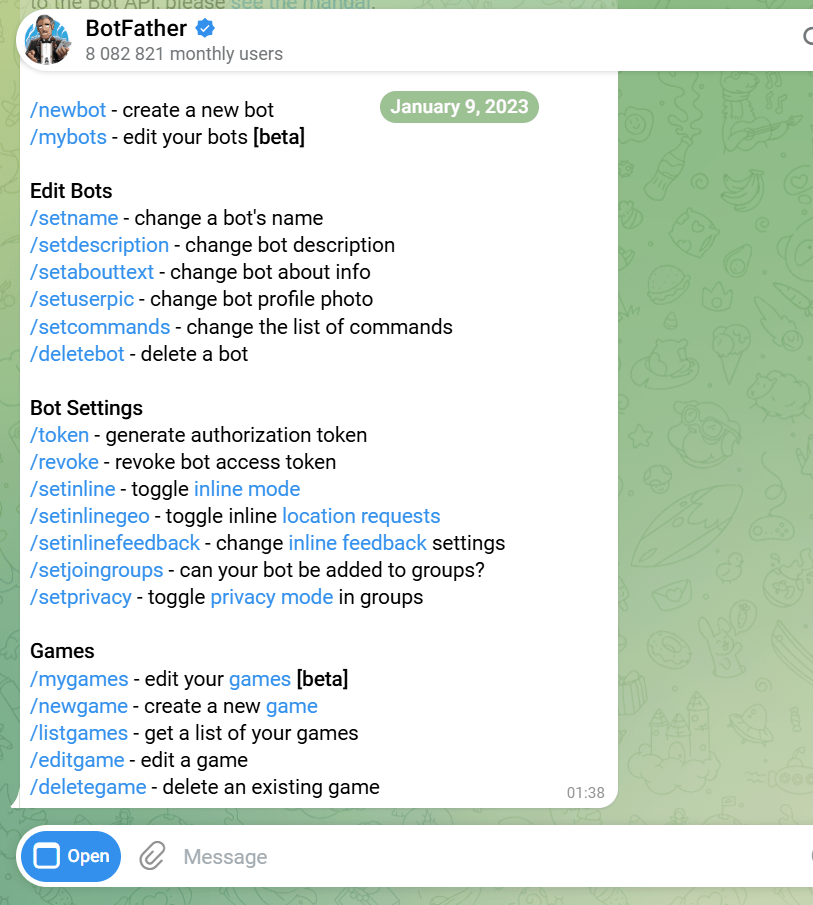
Creating the Bot and Getting the Token
1. In Telegram, search for the official BotFather account, which is the official service for creating bots.
2. Start a conversation with BotFather and send the command /newbot, then enter the bot’s name and its username.
3. BotFather will return the authentication token for your bot; save this token as it is the key to connecting the bot to no-code services.
Configuring Bot Settings
After obtaining the token, you can use BotFather commands to set the bot’s description, assign a profile picture, welcome messages, and even set group restrictions that allow interaction with the bot. This stage is important to ensure users quickly recognize and trust your bot.
Linking the Bot to No-Code Services for Automatic Replies
Example of Using Zapier
1. Log into the Zapier platform and create a new Zap.
2. Choose Telegram Bot as the trigger and enter the bot token.
3. Set the desired event, for example: “New Message Posted to Bot”.
4. Then choose the application that will respond with the message, such as Gmail, Google Sheets, or Webhooks.
5. Specify the welcome message content or the text template you want the bot to send, and publish the Zap to start working immediately.
Example of Using Chatfuel
1. Create a free account on Chatfuel and then select Telegram as the platform.
2. Link the bot using the token and go to the scenario builder dashboard.
3. Add “Blocks” containing messages or buttons that the user will see.
4. Connect the blocks using conditions (If User Says … Then Go To …) to configure the interactive behavior.
Adding Automatic Response Scenarios
Responding to Keywords
You can configure an immediate response based on words or phrases entered by the user through any no-code service. For instance, when typing “price”, the bot sends the price list, and when typing “support”, it sends contact methods for the support team.
Responding with Scheduled Messages
Some platforms allow you to schedule messages to be sent at specific times, for example, reminders for webinars or promotional offers. Simply choose the date, time, and content, and the bot will deliver automatically.
Participating in Groups and Channels
The bot can join groups and channels you manage to publish updates periodically, or to respond to member inquiries and conduct polls. Make sure to adjust the permissions to allow reading and writing without interfering in private conversations.
Tips for Enhancing Bot Performance and SEO Optimization
To make the most of your Telegram bot and to appear optimally in the app’s internal search results, follow these guidelines:
First, choose a clear and descriptive username that reflects your activity.
Second, write an accurate description of the bot in the BotFather settings, including keywords such as “Telegram bot for automatic replies without learning programming”.
Third, ensure that content is updated regularly and create fresh messages related to offers or periodic updates.
Fourth, monitor usage reports in Zapier or Chatfuel to enhance response scenarios and identify the most engaging messages.
Fifth, add a “Start” or “Subscribe” button in the first welcome message to guide users to the list of available commands, thereby providing an organized user experience.
Frequently Asked Questions
Can the bot be used for free?
Yes, you can create a Telegram bot for free via BotFather, and no-code services offer limited free plans that suit the needs of simple bots.
What is the maximum number of messages the bot can send?
Telegram imposes temporary restrictions when sending large amounts of messages within a short period, but this can be overcome with good planning of scheduled messages and targeted responses.
How do I avoid bot blocking?
Avoid sending random promotional messages, and be sure to respect user privacy and comply with Telegram’s policies. It is also advisable to enable the option “Only send messages to users who started the bot”.
Do I need a dedicated server?
No, when relying on no-code services, you don’t need external hosting or a server, as these platforms take care of running the bot and storing its data.
How can I expand the bot’s functions in the future?
You can integrate external APIs, such as payment systems or advanced databases, via webhooks or Integromat tools to design more complex and customized scenarios.