
Contents
Our article today is about Notion and how to use it to organize the books you have and turn them into an interactive library.
Reading books is just the first step towards learning. But the true value lies in extracting knowledge and documenting it and connecting it to each other to form a deep understanding. For reading enthusiasts and lifelong learners, the challenge of organizing these readings and notes becomes increasingly complex with each new book added to the shelf.
This is where Notion comes into play, the versatile tool that goes beyond being just a note-taking application. With flexible database structures and various display options, we can turn a simple reading list into a interactive knowledge library and an advanced note-taking system known as “external memory” or “Second Brain.” In this article, we will review practical and systematic steps to create this system, and how to use the power of Notion in linking ideas rather than just recording them.
What is Notion?
Notion is a comprehensive platform for task management and information organization, combining the features of note-taking, databases, and project planning in one place. What sets it apart is that it gives you complete freedom to build your own workspace—whether you want to create a simple notebook, a daily task page, or a complete team project management system.
Notion provides flexible tools like tables, lists, nested pages, ready-made templates, and database links, making it suitable for students, employees, and entrepreneurs alike. Thanks to its customizable simplicity, it has become one of the most popular tools relied upon by users to organize their digital lives in an integrated and smart way.
Building the Main Books Database
The first and most important step is to create a robust system that can accommodate all your information. In Notion, this is done by creating a Database dedicated to all the books you read, whether fully read, in progress, or on your waiting list.
Why a database?
A database allows you to add properties to each entry (record/book) that traditional notes cannot provide. This enables advanced filtering, sorting, and linking.
Steps to Create the Books Database:
- Create the page: Create a new page in Notion and name it “Knowledge Library” or “Books & Learning Hub.”
- Insert the database: Choose the type Full Page Table Database.
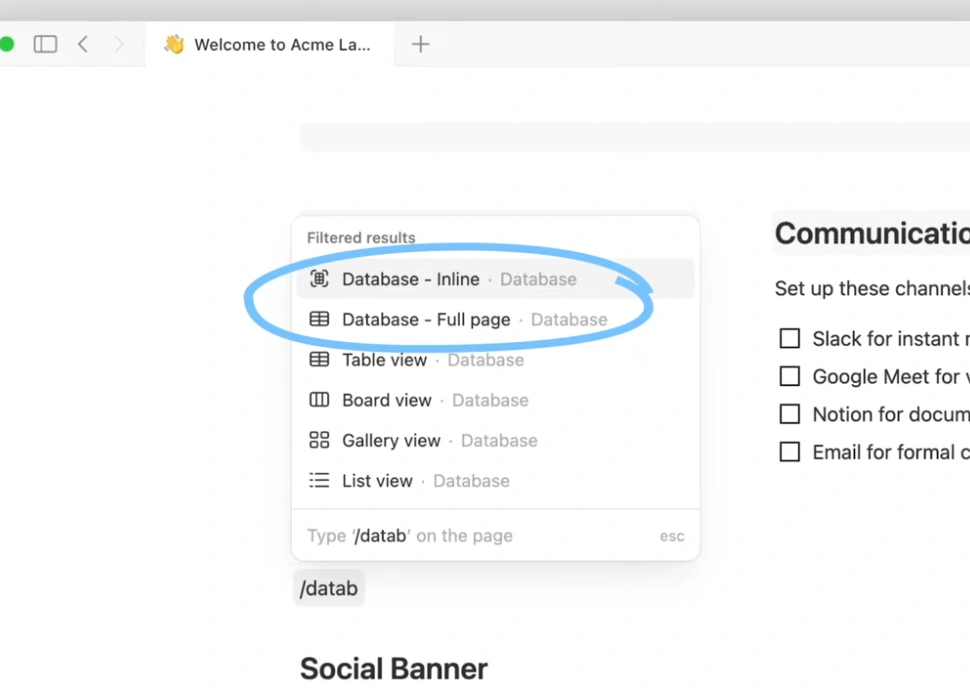
- Add key properties: Customize the following columns (properties) for each book:
| Property | Type | Function |
| Book Title | Title | The main title of the entry. |
| Status | Select | In progress / Completed / Waiting list. |
| Rating | Select/Rating | Personal rating from 1 to 5. |
| Author | Text/Select | The author’s name. |
| Completion Date | Date | The date you finished reading (important for analysis). |
| Genre | Multi-Select | (History, Self-Development, Technology, etc.). |
| Summary/Notes | Page Content | The actual content for review and note-taking. |
🛠️ Practical Tip: Use the “Url” property to add a direct link to the book’s page on Goodreads or Amazon for easy access.
The following video shows how to build a database in Notion:
Advanced Notetaking within Book Pages
This is where the true power of Notion lies. Instead of simply writing a regular summary within the “Summary/Notes” property, each book is turned into a complete Notion page that can be intelligently organized using custom templates. This is the essence of advanced notetaking and external memory.
Why templates?
The template ensures consistency. Each book page will contain the same sections, making it easy to extract information and compare different books.
Steps to Apply the Advanced Notetaking Template:
- Create a new template: Within the books database, select the dropdown next to the “New” button and choose “+ New Template”. Name it “Book Review.”
- Structure the template: Design the template to contain the following sections (using heading features
H2andH3):- Reading Introduction: (Reason for reading the book, expectations).
- Main Ideas and Key Concepts: (Key points using a bullet list).
- Golden Quotes (Highlights): (Use Blockquote or gray color).
- Actionable Takeaways: (What will you do based on what you’ve learned?).
- Personal Synthesis: (Summary of your understanding of the book in your own style).
- Apply the template: Each time you open a new book page, select this template from the top to start notetaking in an organized and unified structure.
Linking Ideas Through Relation Property
The secret that transforms your database from just a list into an interactive knowledge library is using the “Relation” property. This feature allows you to link a specific book page to other pages within Notion, mimicking the way ideas are connected in your mind.
How to Create Knowledge Relations:
Imagine you’ve read two books: the first on productivity (Deep Work) and the second on behavioral psychology (Atomic Habits). You can link the common ideas between them, or link the book to a practical project you are working on.
Steps to Implement Interactive Relations:
- Create supporting databases: Create additional databases in Notion, such as:
- “Projects Database”: for recording your practical tasks.
- “Skills Database”: for tracking the skills you are learning.
- Add relation property: Within the books database, create a new property and choose the type “Relation”.
- Link the database: Choose to link this property to the “Projects” database, for example.
- Apply the link: When you open the “Deep Work” book page, you can add the relation and select the project where you will apply the concept of “deep work.”
Data Visualization (Views)
The beauty of using Notion’s database is the ability to display the same set of data in different ways, aiding in reading data analysis and identifying learning patterns.
Basic Display Methods for Maximum Flexibility:
- Board View:
- Group by: Status property.
- Usage: This turns the library into a Kanban board, where you can drag and drop books between columns (Waiting List > In Progress > Completed).
- Gallery View:
- Show: Book cover image.
- Usage: Visually present books in an appealing layout like a digital bookshelf.
- Filtered List View:
- Filter by: Rating property > More than 4 stars.
- Usage: Create a quick list of the best books you’ve read that are worth rereading or recommending to others.
Download Notion for PC and Mobile
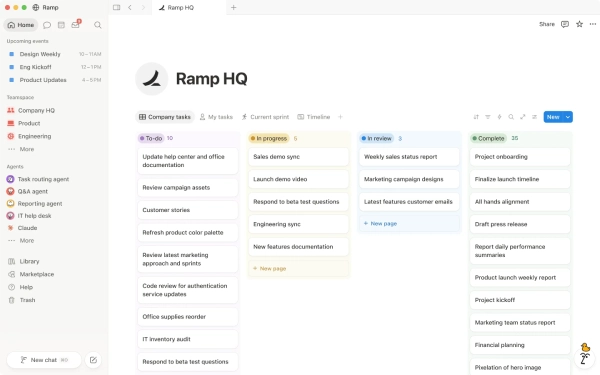
Notion provides you with a faster, more organized experience and easier access to your content. Notably, there are companion apps available, such as Notion Calendar for PC and Notion Calendar for mobile, among others.
The Notion desktop app is available for Windows and Apple, and it currently supports the following versions:
- Windows:
- Windows Universal x64/ARM64
- Windows MSIX x64
- Windows MSIX ARM64
- Windows .exe x64
- Windows .exe ARM64
- macOS:
- macOS Universal
- macOS Apple Silicon
- macOS Intel x64
The company also offers the Notion mobile app, supporting both Android and iOS.
Additionally, it offers Notion Web Clipper, an extension that can be installed on the Google Chrome browser to save web pages directly to Notion.
From Ordinary Reader to Organized Thinker
By using Notion as an integrated tool, reading books is no longer just a hobby; it has evolved into an organized knowledge investment process. You are now not only recording what you read but creating a coherent mental map of your ideas, ensuring easy retrieval of information and turning it into practical application.
Applying these practical steps to create a books database, relying on custom templates for advanced notetaking, and activating the relation property to link ideas places you among organized thinkers, ready to extract the maximum value from every page they read.