
Contents
In this article, you will learn effective and practical ways to find out who has unfollowed you on Instagram without the need to use external programs, along with tips to strengthen your audience’s loyalty and maintain their engagement.
However, if you enjoy using programs to find out who unfollowed you on Instagram for iPhone or Android, several apps will be explained in our article today.
The success of your Instagram account partly depends on the engagement of your followers and their continued following of your content. Sometimes you may notice a drop in the number of followers without knowing the real reasons for it.
Check out: Logging into Instagram Web from Google
What is the Importance of Knowing Who Unfollowed?
Knowing who unfollowed your account helps you evaluate the content strategies you rely on. If you identify a specific pattern in unfollows after sharing a certain type of post, it indicates that you should reconsider your content style, timing, or approach to attract the attention of your target audience.
Moreover, monitoring your Unfollow Rate contributes to improving your account’s performance analytically, as this information can be combined with engagement statistics to make data-driven decisions.
How to Know Who Unfollowed on Instagram Without Apps
Manual Methods to Know Who Unfollowed You
- Regularly Check Your Followers List:
The simplest way to know who unfollowed you is to periodically monitor your followers list. Open your profile, then click on “Followers” and compare the list with a previous saved list. Of course, this method may take time and effort if you have thousands of followers, but it remains the safest as it does not require external applications. - Track Suspected Accounts:
When you notice a decline in followers after posting certain content, count the lost followers by reviewing accounts that previously had high interactions with your posts and suddenly stopped. Open the followers page and manually search for accounts that ceased interacting. This may help you uncover a behavioral pattern or specific age or geographical group affected by the type of content. - Use the “Close Friends” Feature in Reverse:
If you have a limited group of loyal followers, you can add them to the “Close Friends” list and then post exclusive content for them. You can monitor the notifications for close friends and see who consistently views these stories. If someone suddenly stops viewing them, it’s likely that they unfollowed you or hid your stories.
Check out: The Best Time to Post on Instagram According to Algorithms 2026 to Increase Engagement
Using Instagram Insights for Business Accounts
If you have a business or creator account, Instagram provides you with the built-in Insights tool. Through this tool, you can:
- Know the number of gained and lost followers over a specific time period.
- View the age, gender, and geographic location of people who unfollowed you.
- Analyze the impact of your posts on gaining or losing followers.
All this data helps you improve your content strategy, posting plan, and targeting more accurately.
Checking Notifications and App Alerts
Instagram occasionally sends a notification when a significant change happens in follower count, especially when more than one follower disappears in a short time. Regularly check your notification center, as this may give you an immediate alert about losing new followers.
You can also enable “Follow Notifications” to receive alerts when you gain a new follower or lose older ones. Then, you can compare the timing of the notifications to understand the reasons for the decrease.
You may be interested in: Fixing the Issue of Messages Not Appearing After Activating Encryption on Instagram
Apps to Know Who Unfollowed You on Instagram for iPhone and Android
There are many apps that allow you to find out who unfollowed you on Instagram for iPhone or Android and provide many analytics about your account. They are available on the App Store for iPhone and the Google Play Store for Android.
Follower monitoring apps rely on the idea of logging into your account and having access to monitor the account. Through these permissions, they can determine who unfollowed and who stayed.
One of these apps is Reports+ which offers many analyses (over 50 analyses) including lost and gained followers, accounts that blocked you. Here are some examples:
- Profile interactions
- Story interactions
- Discover your secret admirers
- Know who you liked the most?
- Top followers
- Ghost followers
- Post analytics
- Accounts you care about
- Gained followers: Discover your new followers in real-time.
- Lost followers: Who unfollowed you?
- Your followings
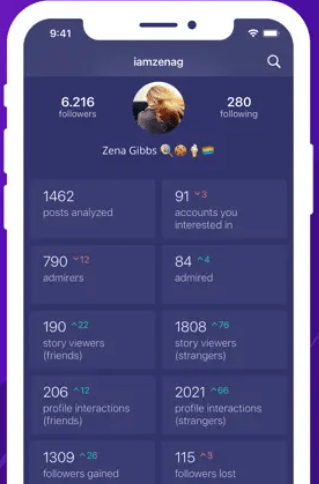
Another notable app is Followers who unfollow me, as well as the FollowMeter app.
Caution should be exercised when using these analytics programs as they also offer reposting services and using external applications may violate Instagram’s security policies and may sometimes lead to account restrictions or bans.
Check out: How to Recover a Permanently Deleted Instagram Account After 30 Days
Additional Tips to Maintain Engagement and Increase Retention Rates
Provide High-Value Content
Your followers are looking for educational, entertaining, or inspirational posts that meet their needs. Make sure to share content that includes analysis or practical tips, and rely on studying your target audience’s interests through polls and question stickers in stories.
Engage Effectively with Followers
Make sure to respond to comments and direct messages, and thank your followers for their support. The more followers feel that your account interacts with them personally, the stronger their attachment will be, reducing the likelihood of unfollowing.
Maintain Regular Posting Schedules
Having a content plan and a consistent posting schedule ensures that your followers know when to expect you on the platform. Using built-in or independent scheduling tools helps you maintain regular posts and keep your audience’s interest high.
Related: How to Request Verification of Your Instagram Account for Free
Frequently Asked Questions
Can I Recover Followers Who Unfollowed Me?
There is no official way to recover followers who decided to unfollow you, but you can attract their attention again by providing innovative content and sending promotional direct messages (DMs) to old fans explaining the new developments in your account.
Why is the Unfollow Rate Important to Me?
The unfollow rate is directly related to the quality of content and posting strategy. A decrease in this rate indicates follower satisfaction and their willingness to stay with you long-term, which increases your credibility on the platform.
Will Unfollowing Affect the Visibility of My Content?
Indirectly, yes. If the number of unfollows increases after every post, this is an algorithmic signal that your content is less appealing, and your chances of appearing in the Explore page or the followers’ feed may decrease.
Is there an Automatic Method Without External Apps?
Instagram does not provide an official automatic feature to notify you of every unfollow event. The best available methods now rely on periodic manual checks or using Instagram Insights in business accounts.
By following these manual methods and utilizing Instagram’s official tools, you can monitor your account and know who unfollowed you without worrying about using external apps that might violate the platform’s policies. And don’t forget to always focus your efforts on providing exclusive and useful content to maintain your audience’s loyalty and continuously increase engagement.
Check out the article: Logging into Instagram from Google – Instagram Web
And you? Do you prefer using an external app or do you prefer using safe manual check methods?


