Contents
Many users are surprised to lose access to their accounts on Instagram due to accidental permanent deletion or after the account has been hacked. Although Instagram’s policy states that the automatic recovery period ends after 30 days, there are some actions that can be taken to recover the account or contact support for a special review.
In this article, we will provide a detailed step-by-step guide to recover a permanently deleted Instagram account after 30 days, relying on recent experiences and reports from foreign sources such as the Instagram Help Center, Meta’s privacy policy terms, and the European General Data Protection Regulation (GDPR) guidelines.
You may also be interested in: How to Recover a Hacked or Disabled Facebook Account Without Email
Check Your Account Status
Before taking any action, make sure your account is permanently deleted and not temporarily disabled. Sometimes, users think their accounts are permanently deleted when they have just been disabled until they are reactivated. Follow these steps:
Try Logging In
Access the Instagram app or website and enter your account details (email or username and password).
* If you see the message “Your account is temporarily disabled,” this indicates that it can still be automatically restored by clicking on “Temporarily Disable Account” then next.
* If you see the message “This account is not available” or “Page not found,” this usually indicates a permanent deletion.
In any case, try to log in through Instagram’s account recovery link
Check Email Notifications
Look in your inbox and spam folder for any notifications from Instagram regarding the deletion or deactivation of your account. Instagram keeps detailed messages in case a deletion request has been submitted for the account.
Steps to Recover the Account After 30 Days
Despite the end of the 30-day period for the permanent deletion of the account from Instagram’s operational databases, you can resort to support mechanisms and legal reviews. Follow these steps in order:
Step One: Fill Out the Account Appeal Form
- Go to the “Need more help?” page on the Instagram Help Center (help.instagram.com).
- Select “Login Issues” then “Disabled or Deleted Accounts.”
- Fill out the appeal form mentioning your username and the email address you used, and if possible, the date of the account deletion and the possible reason for deletion.
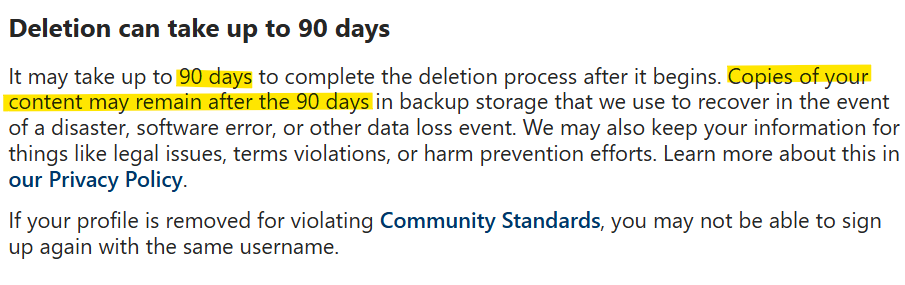
The good news is that officially in Instagram’s support files, it was announced that your account files remain for up to 90 days from the time of account deletion and even more than 90 days. Therefore, you should try to recover the account during that period. And be sure that if you reach support and talk to them, the chances of recovery are very possible.
Step Two: Verify Your Personal Identity
The support team may request a document to verify your identity and ownership of the account—such as a passport photo or driver’s license.
* Make sure to send the documents at a high quality along with a short message explaining your desire to recover the account.
* Ensure to cover any sensitive information not related to verification (like the full passport number if it’s unnecessary).
Step Three: Use Your Data Request Under GDPR
According to the European General Data Protection Regulation (GDPR), you can formally request all data related to your account with Meta.
1. Go to the “Request Your Data” page on the Meta website.
2. Select “Instagram” and specify the timeframe before the deletion order.
3. In the notes field, explain that you would like to download your data to use it as evidence for account recovery.
4. After receiving the archive, use it to indicate your ownership of the content in your next correspondence with support.
Step Four: Directly Contact Meta Support
If you have not received a response via the regular forms within two weeks, you can look for the official support accounts on Twitter or Facebook and send a private message including the following files:
* Screenshots of the submitted forms.
* The archive file received under GDPR.
* A document verifying your identity.
Using multiple contact methods increases your chances of getting an official response that is exceptional regarding the 30-day policy.
Read Also: Solution for the issue of messages not appearing after activating encryption on Instagram
Additional Tips
To increase your chances of recovering the account and avoiding potential deletion in the future, consider the following tips:
Regular Backup
It is preferable to regularly download your data and use the “Download Your Data” feature in the settings before any emergency occurs. You can rely on cloud storage services like Google Drive or Dropbox.
Link Your Account to Facebook
By linking to a Facebook account, Instagram allows an additional recovery mechanism through the “Log in with Facebook” feature, reducing reliance on email only.
Enable Two-Factor Authentication
You can enable two-factor authentication (2FA) via text messages or authentication apps such as Authenticator; this protects your account and reduces the risk of hacking or accidental deletion.
Read Also: Permanently Deleting a Facebook Account from Phone and Computer
Frequently Asked Questions
Can the account be recovered 100% after more than 30 days?
Instagram does not guarantee account recovery after 30 days, but through legal communication and using GDPR, the chances may reach 30–50% in some exceptional cases.
What documents are generally required for an appeal?
The company usually asks for an ID document bearing your photo (passport or national ID card) and proof of account ownership such as the SIM card linked to your account or receipts for funded ads.
How long does it take to wait for a response from support?
The first response may arrive within one to three weeks, depending on the volume of requests and the clarity of the submitted documents.
By following the previous steps while ensuring to provide clear data and documented evidence, you will increase your chances of recovering your permanently deleted Instagram account after 30 days. Always remember the importance of keeping backups and activating security options to prevent falling into such issues in the future.