Contents
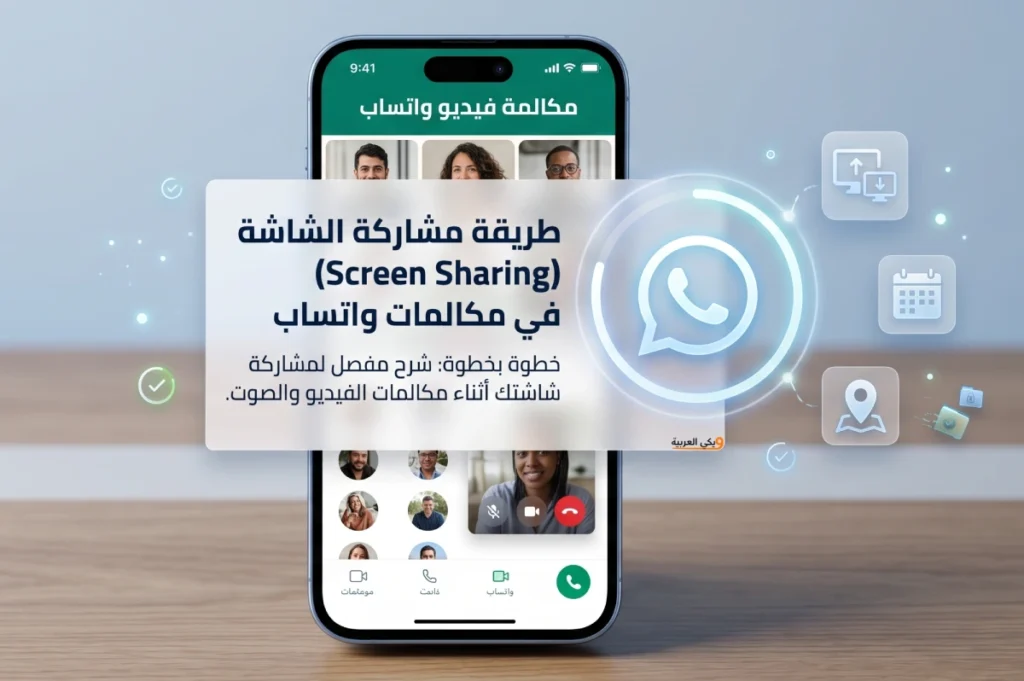
The screen sharing feature in WhatsApp video calls is a powerful tool that allows users to instantly display content from their phones or tablets on the screens of other participants. Whether you want to give a presentation, review photos and documents, or guide someone through a specific app, this feature makes your communication more interactive and clear.
In this article, we will review the detailed steps to enable and share the screen on WhatsApp professionally, while considering best practices and providing additional tips to ensure a smooth and secure experience.
You may also be interested in: How to Record WhatsApp Calls on Android and iPhone
Requirements for Screen Sharing in WhatsApp
Before starting the steps to enable this feature, you should ensure a set of basic points to guarantee that it works correctly on your device:
- WhatsApp App Version: You must have the latest version of the WhatsApp app installed on your device, whether it runs on Android or iOS. You can update via the Google Play Store or the App Store. Recent updates add improvements to video quality and fix security performance issues.
- Operating System: Your device’s operating system should support screen sharing. On Android, it is preferable to have version 6 or higher, while on iPhones, iOS 13 or later is recommended to ensure stability and functionality without issues.
- Stable Internet Connection: The quality of screen sharing largely depends on the speed and stability of your internet connection. It is preferable to use a high-speed Wi-Fi network or a stable 4G/5G connection to ensure smooth and uninterrupted video and image streaming.
You may also be interested in: Log in to WhatsApp Web on the Computer through Google
Steps to Share Screen in WhatsApp Video Calls
Follow the steps below to start sharing your screen during a video call on WhatsApp:
1. Start the Video Call
Open the chat of your friend or the group you wish to connect with, then click on the “Video Call” icon Wait for the other party to respond and the video window to appear.
2. Open the Options Menu
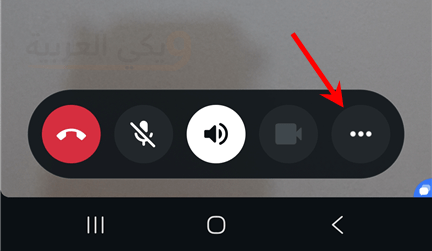
After opening the video call, you will find various icons to control the microphone, camera, and settings at the corners of the screen or at the bottom. Click on the three-dot icon (⋮) or the icon for more options, depending on your device type.
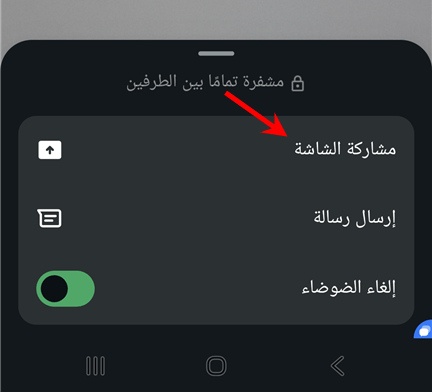
3. Select “Share Screen”
In the options menu, the “Share Screen” or Screen Sharing icon will appear. Tap it, and the system may require you to grant permission to start recording or live broadcasting what is happening on the screen. Press “Start Now”.
4. Return to the Home Screen and Share Content
You will temporarily exit the WhatsApp interface to the home screen of your phone, and a live broadcast of everything you do on your device will be created. You can open the apps, photos, or documents you want to display. Everyone in the call will see exactly what you see.
5. Stop Screen Sharing
To end the broadcast, return to the WhatsApp call and click on the screen sharing notification in the notification bar (on Android) or press the colored bar at the top of the screen (on iOS), then select “Stop Sharing”.
You may also be interested in: Download a Second WhatsApp on the Same Device Samsung or iPhone or Huawei
Best Practices for Screen Sharing in WhatsApp
Screen sharing requires some precautions to ensure a comfortable and safe experience:
- Close Sensitive Apps:
Before starting to share, close any apps that contain personal data or sensitive information such as banking apps or passwords to avoid accidentally revealing any data. - Pre-Test:
It is best to conduct a short test before the important session to ensure the audio and video quality and the clarity of the content you wish to present. - Enable “Do Not Disturb” Mode:
It is advisable to enable “Do Not Disturb” mode on your device to avoid receiving calls or other notifications that may disrupt the session and appear to the participants. - Monitor Battery and Data Usage:
The screen broadcasting feature drains the battery quickly and you may need to monitor the charge level, as well as data if you are on a limited plan. Using a fast charger during the session can be helpful.
Additional Tips for Screen Sharing in WhatsApp
To increase the effectiveness of your screen sharing, try the following:
- Use a Screen Pen or Attention Marker:
On some devices, you can enable the live drawing feature or use a pointer to highlight a specific area on the screen, making it easier to guide viewers’ attention to important details. - Adjust Display Resolution:
If the connection is unstable, reduce the streaming resolution if possible from the app settings to improve connection continuity and avoid interruptions. - Split Screen:
On devices that support split-screen, you can display two or more apps side by side and explain everything in sequence without needing to navigate back and forth frequently.
Frequently Asked Questions
Can I share internal audio with the screen?
Currently, WhatsApp does not support sharing the device’s internal audio with the screen broadcast, and you will only be heard through the microphone.
How many participants are allowed to view one screen?
All members of the video call are allowed to view the shared screen at the same time, whether the call is one-on-one or a group of up to 8 or more members depending on the app updates.
Can I share the screen while using the rear camera?
No, once screen sharing is activated, the broadcasting of the front or rear camera is automatically stopped, and the window switches to screen display only.
What is the difference between screen sharing in WhatsApp and other applications?
Although the principle is similar, WhatsApp focuses on simplicity and ease of access without needing to create separate accounts or external add-ons. This makes it a convenient option for instant communication.
Read also: 10 Secret WhatsApp Features Many People Don’t Know