Contents
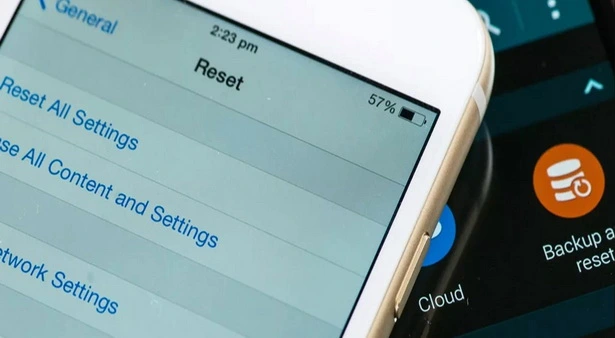
Before discussing how to permanently factory reset your phone (whether Samsung, iPhone, or Huawei), let us first define what formatting or factory resetting actually means.
Formatting a mobile device is the process of completely erasing all stored data, including photos, videos, contacts, messages, apps, and system settings. Samsung and all major manufacturers provide built-in options to perform this action via the factory reset feature.
A complete mobile format involves wiping all information on the device and reinstalling a fresh operating system copy. This is typically used when encountering major OS errors or malware infections, and it is frequently executed via a computer.
How to Format a Mobile Device
As defined, formatting is the process of completely wiping a device along with all its data. In this article, we will focus on formatting via factory data reset. The exact procedure varies depending on the operating system provided by the manufacturer, as well as the specific software version installed on the device.
We strongly recommend backing up all mobile data before proceeding with a factory reset.
You may also like: Factory reset without deleting data
How to Permanently Format a Samsung Device (Modern Android OS)
When formatting a Samsung Galaxy running Android, it is essential to identify the operating system version. In this section, we will cover formatting across both legacy and modern releases, from Android 7 up to current software versions like Android 14 and beyond.
Samsung Android Formatting Steps
You can format an Android device using the following steps:
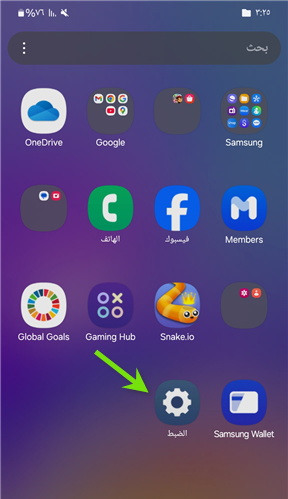
- Open Settings from the app drawer or main menu.
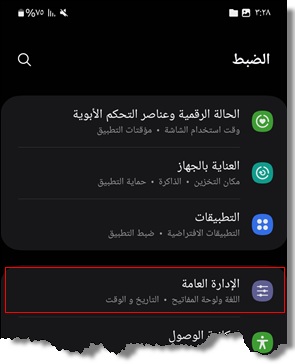
- Scroll down and tap General management.
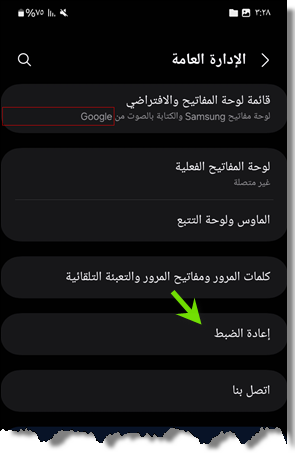
- Select the Reset option located near the bottom.
- Tap Factory Data Reset at the bottom of the page.
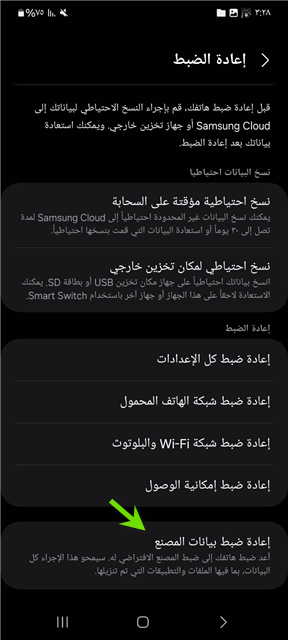
Performing a factory data reset restores the smartphone to its original out-of-the-box state. All data, photos, installed apps, and custom configurations are removed, completing a full phone format.
You can select “Reset all settings” instead of factory data reset if you wish to restore default device configurations without deleting your personal files.
Formatting Legacy Samsung Devices (Android 10, 9, 8, or 7)
To format older Samsung devices running Android 10 down to Android 7 (Nougat), follow these steps:
Time needed: 15 minutes
How to permanently format a Samsung device
- Access Settings
Navigate to
Settingsvia the notification shade or app menu.
- General Management
Scroll down to find
General management.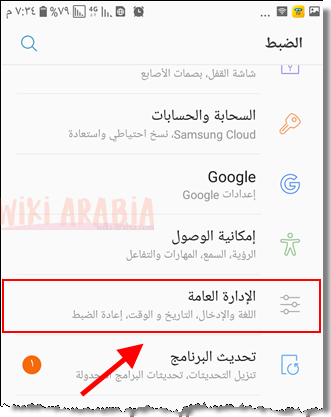
- Reset
Tap the
Resetoption.
- Factory Data Reset
Select
Factory data reset.
- Warning Confirmation
A warning message will indicate that all data, apps, and accounts will be erased. Scroll down and press the
Resetbutton.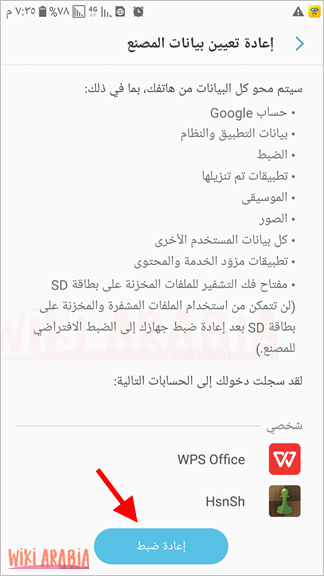
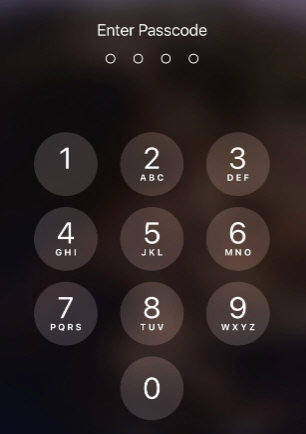
- Enter Screen Lock Code
Enter your device’s PIN, password, or security pattern when prompted.
- Confirm Data Erasure
A final confirmation window will appear. Tap Delete all to start formatting.

After tapping the button, all apps, photos, contacts, messages, and saved login credentials will be erased (external SD memory card data remains untouched). The phone will automatically reboot, loading only factory default applications.
Important: If a Google account is active on the phone, ensure you remove it prior to formatting. Otherwise, Factory Reset Protection (FRP) will trigger, requiring the account password upon startup. Make sure you know your Google account credentials.
To review linked accounts, open Settings > Accounts and backup > Manage accounts > Google. Select your account, tap options in the top corner, and choose Remove account.
Formatting Samsung Devices Running Android 6 (Marshmallow) and Older
Samsung phones running legacy Android builds can be formatted using these steps:
- Open the device Settings menu.
- Scroll down to select Backup and reset.
- Choose Factory data reset from the submenu.
- Review the warning prompt and tap Reset device.
- Confirm the action by pressing Delete all.
The reset process will begin immediately, and the phone will reboot into its factory state loaded only with default stock apps.
How to Format an iPhone
Performing a factory reset on an iPhone running iOS is straightforward. However, proper care must be taken regarding signed-in Apple accounts, especially when transferring or selling a device. If an iCloud account remains linked prior to a reset, Activation Lock will block access. Follow this procedure:
(You can skip steps 2 through 6 if the iPhone is your primary personal device and you own the linked iCloud account.)
- Open the Settings app.
- Tap the Apple ID banner / account name located at the top of the menu.
- Select Find My (or
Find My iPhone). - Toggle Find My iPhone to Off. You will be prompted to enter the Apple ID password to confirm sign-out.
- Return to the main Apple ID screen, scroll down to the bottom, and tap Sign Out.
- When prompted to keep a copy of your data on the phone, leave the toggles disabled (since the goal is a complete wipe) and tap Sign Out again to confirm.
- Return to main Settings and tap
General. - Scroll down to the bottom and select Transfer or Reset iPhone (or Reset).
- Tap Erase All Content and Settings.
- Enter your device passcode or restrictions passcode if prompted.
- Confirm by tapping Erase iPhone.
This method applies across iOS devices, including models such as iPhone 11 Pro, iPhone 11 Pro Max, and newer releases.
How to Format a Locked iPhone Without a Computer
According to official documentation from Apple Support, devices running iOS 15.2 or later allow users to erase and reset a locked iPhone directly without connecting to a computer using the Security Lockout / iPhone Unavailable screen feature. Follow these steps:
- After entering the incorrect passcode multiple times, the display will show a Security Lockout or iPhone Unavailable screen.
- Tap the Forgot Passcode? option located in the bottom corner of the screen.
- On the Security Reset screen, tap Erase iPhone.
- Enter Apple Account Credentials: Input the password for the Apple Account (Apple ID) registered on the device to sign out and begin wiping the phone.
Prerequisites for this method: The iPhone must be connected to an active Wi-Fi or cellular network, and Find My iPhone must have been enabled prior to locking out.
This process will not bypass an active iCloud Activation Lock. If you do not possess the credentials for the registered Apple Account, the device will remain locked at the Activation Lock screen upon startup.
How to Format a Huawei Device
Formatting a Huawei smartphone is straightforward and can be completed through recovery mode by following these steps:
- Press and hold the Power button until options appear, then tap
Power offto completely shut down the device. - Press and hold both the Volume Up and Power buttons simultaneously for about 6 seconds, then release the Power button while continuing to hold Volume Up until the recovery menu appears. (Note: If the phone boots normally, power off and ensure Volume Up is engaged slightly before pressing Power).
- From the EMUI Recovery menu, select Wipe data/factory reset.
- Confirm the action by typing
yesusing the onscreen keyboard when prompted. - Tap Wipe data/factory reset again to confirm.
- The formatting process will start, showing a progress percentage indicator.
- Once finished, select
Reboot system nowfrom the recovery menu.
When the system restarts, select your preferred language, tap Next, and proceed through the initial setup wizard.