Contents
Our article today is beautiful and diverse, answering the most important questions about the health or age and condition of the hard disk, whether SSD or HDD. We will answer many questions such as which hard drives last longer? Does the age of the hard drive affect the speed of the computer? When can we say that the hard drive should be replaced, and much more.
Introduction
Storage devices are among the most influential components on the speed and stability of a computer. Storage options vary between traditional hard drives (HDD) and modern solid-state drives (SSD), raising many questions about lifespan, reasons for slowness, and assembly strategies.
You may be interested: How to Check the Status and Age of the Laptop Battery on Windows 10 and 11
1. Is it true that the lifespan of an SSD is shorter than that of an HDD?
Not true under normal daily and real-world use.
The way both types operate is fundamentally different, which determines how each one fails:
- HDDs: Rely on moving mechanical parts (magnetic disks that rotate and a read/write head). HDDs can fail due to mechanical friction, overheating, or shocks and vibrations during operation.
- SSDs: Rely entirely on electronic memory chips (NAND Flash) without any moving parts. Their technical lifespan is measured by the TBW indicator (Terabytes Written – total terabytes written).
In home use, gaming, and content creation, an average user may take many years (possibly exceeding 10 to 15 years) to reach the TBW limit specified by the manufacturer. Since SSDs are not affected by shocks or motion, they are practically more durable and longer-lasting for daily use compared to HDDs.
2. How to determine the health of the hard drive and if it is the cause of the computer’s slowness?
How to Check Hard Drive Health:
You can read the S.M.A.R.T data stored on the disk using specialized programs that show the overall health percentage and current errors:
- CrystalDiskInfo: A free lightweight program that shows the drive status directly (Good, Caution, Bad), temperature, and amount of data written.
- Hard Disk Sentinel: Provides an accurate analysis of damaged sectors and the expected remaining life in days.
- Official programs: Such as Samsung Magician or Western Digital Dashboard.
You may be interested: The difference between SATA and NVMe SSDs: Which one to choose for your device?
Steps to check and evaluate the health of storage devices using the programs CrystalDiskInfo and Hard Disk Sentinel:
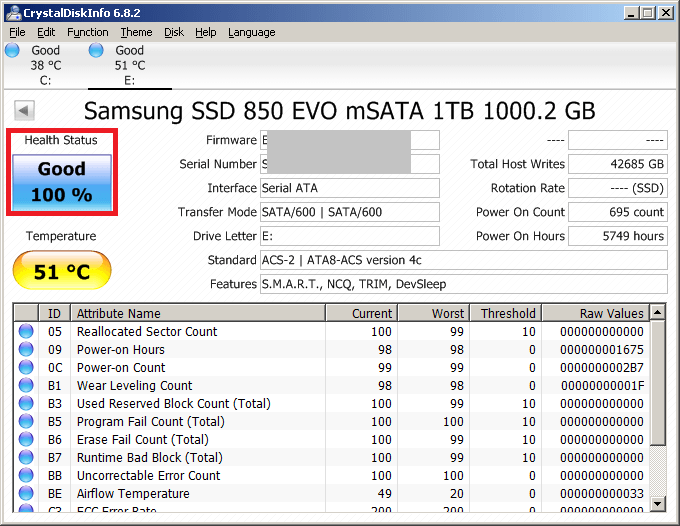
1. Checking Hard Drive Health Using CrystalDiskInfo
copyrights superuser.com
This program features providing an immediate result upon launching without the need for lengthy tests.
Steps:
- Download the program: Download the free version (Standard Edition) and provide admin permissions to run it.
- Select the disk: From the top bar, choose the hard drive you want to check if you have more than one installed drive.
- Read the general health status (Health Status):
- Good (Blue/Green): The drive is in excellent condition, and there are no significant issues.
- Caution (Yellow): The drive has started losing some sectors (Bad Sectors/Reallocated Sectors) and needs close monitoring with an immediate backup of important files.
- Bad (Red): The drive is prone to complete failure or stopping at any moment and should be replaced immediately.
- Review important indicators:
- Temperature: Normal temperature ranges from 30 to 50 degrees Celsius. Exceeding 60 degrees reduces hard drive performance and causes slowness.
- Total Host Writes: (for SSDs) shows the total amount of data written to the drive to see how close it is to the TBW limit.
Download the CrystalDiskInfo program.
2. Checking Hard Drive Health Using Hard Disk Sentinel
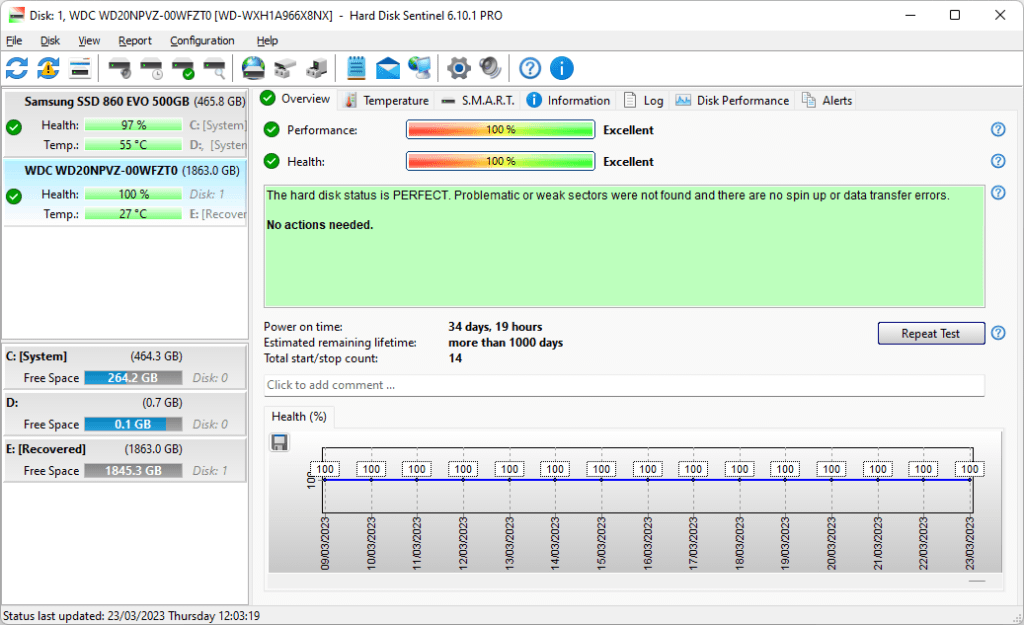
This program provides a detailed report that includes health percentage and estimated remaining lifetime in days, with textual explanations for any mechanical or electronic issues.
Steps:
- Install and run the program: Open the program, and it will automatically scan all the drives connected to the device.
- Select the hard drive from the left sidebar: Click on the drive you want to evaluate.
- Read the Overview tab:
- Health %: The health percentage of the drive. If it is 100%, the drive is in excellent condition. Any drop below 100% indicates the presence of bad sectors or data transfer errors.
- Performance %: The overall performance percentage of the drive.
- Estimated remaining lifetime: A time estimate of the remaining life of the drive (for example: More than 1000 days).
- Text Area: The program writes a clear description in simple language (for example: “There are 5 weak sectors found…”).
- Perform a surface test to check for damaged sectors:
- From the top menu, click Disk and then select Surface Test.
- Select Read Test and then click Start Test.
- The program will begin scanning all blocks:
- Green: Healthy sectors with excellent response times.
- Yellow: Slow-responding sectors (may cause system hangs).
- Red: Completely damaged sectors (Bad Sectors) that require immediate disk replacement.
Download the Hard Disk Sentinel program
Signs that indicate the hard drive is the cause of the device’s slowness:
- 100% disk consumption in Task Manager: When opening Task Manager and noticing that the disk column remains at 100% continuously, while the read and write speeds do not exceed a few kilobytes or megabytes.
- System freezing: The Windows operating system becomes unresponsive for seconds when opening a folder, launching a program, or saving a file.
- Severe slowness in Windows boot: The system takes several minutes to reach the desktop.
- Clicking sounds (in HDDs): Repeated clicking or squeaking noises indicate damage to the mechanical read head.
3. Can an external hard drive be relied upon for booting, or will it be slow?
It can technically be relied upon, but its efficiency and speed depend entirely on the type of external drive and the connection port:
| Type of External Hard Drive | Connection Port Used | Performance as a Boot Drive |
| External HDD | USB 3.0 / USB 2.0 | Very slow; suffers from significant response delays (High Latency) and low random read operations. |
| External SATA SSD | USB 3.1 / USB 3.2 Gen 1 | Acceptable; works well for light tasks and portable systems. |
| External NVMe SSD | USB 3.2 Gen 2 (10Gbps) or Thunderbolt 3/4 | Very fast; offers performance comparable to internal drives. |
Recommendation: It is not recommended to use an external hard drive as a permanent main system drive except in emergency situations, maintenance, or running a secondary system (such as Linux on an external unit), as internal connection (PCIe M.2 Direct) ensures higher stability and prevents accidental cable disconnection.
4. Why do they install more than one hard drive in computer builds?
Builders and engineers resort to installing two or more drives for operational and economic reasons:
- Separating the operating system from data: A fast SSD (such as NVMe M.2) is dedicated to the OS and programs, while games and large files are stored on another drive.
- Ease of maintenance and data protection: In case of a failure in the operating system or the need to reinstall Windows (Format), the data stored on the secondary drive remains completely safe without the need to transfer it.
- Cost-effectiveness vs. capacity: Ultra-fast drives (NVMe) are higher priced per gigabyte. Hence, a medium-capacity NVMe drive (512GB – 1TB) is purchased for the operating system, and storage is supplemented with a larger SATA SSD or HDD (2TB – 8TB) at a lower price.
- Distributing the read and write load: In fields like video editing, one drive is allocated for reading raw footage, and another for writing and exporting the final video, to prevent bottlenecking of read and write speeds on one drive.
Related: The difference between SSD and HDD… Which one should I choose?
5. What are the best types of hard drives currently?
Firstly: The best NVMe M.2 SSDs (for booting, gaming, and high performance)
- Flagship:
- Samsung 990 Pro: High speed and performance in processing and endurance.
- WD_BLACK SN850X: Excellent for gaming PCs and PS5.
- Crucial T700 / T500: Option with PCIe 5.0 interface for ultra-high read speeds up to 12,000MB/s.
- Budget/Mid-range:
- WD Blue SN580: An economical option that provides stable performance.
- Crucial P3 Plus: Good performance at a reasonable price for large capacities.
- Kingston NV2 / NV3: Excellent choice for building budget-friendly builds.
Secondly: The best 2.5-inch SATA SSDs (for upgrading old devices)
- Samsung 870 EVO: The most stable and long-lasting drive in the SATA category.
- Crucial MX500: Combines an economical price with the presence of cache memory (DRAM) to improve response times.
Thirdly: The best HDDs (for massive storage and archiving)
- Western Digital Blue / Seagate BarraCuda: For everyday desktop file and media storage.
- WD Red Plus / Seagate IronWolf: Designed for heavy-duty work and network storage (NAS) with continuous operating hours (24/7).